To choose a real-time sales coaching tool, first rule out every tool that cannot hear the calls your reps actually make: the dialer, the softphone (a calling app on the computer), the mobile phone, Zoom or Teams. Then judge what lands on the rep’s screen while the prospect is still talking: whose words, how fast and how little. Then test it on ten of your own calls before you sign, whether you run a Switzerland B2B sales team in Zurich or an inside sales floor in New York.
At CallPrompter we build one of these tools, a desktop overlay (a small window on the rep’s screen that only the rep sees), so we put our own product through the same 12-question checklist below, including the calls it can’t hear.
Key takeaways
- The call channel decides first: a tool that can’t hear a call can’t help on it, however long its feature list is.
- Seven kinds of tool are sold as “sales coaching”, and only some of them put anything on the rep’s screen while the prospect is still talking.
- Phone calls and dialers can be coached live through two routes: guidance built into the dialer you call through, or a desktop overlay that listens to the computer’s audio.
- A live prompt has to be read in a glance, so ask every vendor whose words it shows, how fast it lands and how many words it uses.
- Consent rules follow the people on the call: New York’s eavesdropping law is satisfied by the consent of one party, California’s Penal Code requires the consent of all parties to a confidential call, and in Switzerland a participant who records a private conversation without the others’ permission can be prosecuted on complaint.
- We know of no independent study showing that live prompts raise win rates on sales calls, so a one-week test on ten of your own calls is the evidence that counts.
What counts as real-time sales coaching
Real-time sales coaching, also sold as live call coaching, is help that appears while the prospect is still talking: the next discovery question, the answer to an objection, a cue such as “slow down” or “ask about budget”. Coaching that reaches the rep after the call (a scorecard, a summary, a manager’s comment on a recording) is useful too, but it can’t change the call it’s about. Plenty of tools sold under “real-time” do their main work afterwards, so the first question in every demo is simple: what does the rep see during the call?
CallPrompter is real-time sales coaching software for live calls, built in Switzerland by Carigiet Labs GmbH. CallPrompter shows B2B sellers, SDRs and sales teams the next question and their own scripted objection answers during Zoom, Teams and phone calls.
The name invites the teleprompter reading, and it’s the wrong one: CallPrompter doesn’t scroll a script line by line. It follows the conversation by meaning and shows the line that fits what the prospect just said.
Which kind of tool fixes which problem
The table compares tool types, not brands, because the type decides what a tool can hear and when it can help.
| Tool type | Best for | What appears during the call | Phone and dialer calls | Zoom, Teams and Meet | What it needs from your setup |
|---|---|---|---|---|---|
| Guidance built into a sales dialer or phone system | Teams that place every call through one platform | Prompts or cards triggered by what is said | Yes, on calls placed through that platform | Depends on the platform’s meeting connections | Every rep calling through that dialer or phone system |
| Desktop overlay that listens to the computer’s audio (for example CallPrompter) | Reps on mixed setups who want their team’s own approved answers on screen | Questions, scripted objection answers and cues in a window only the rep sees | Yes, when the call’s audio plays through the computer | Yes, and nothing joins the call | A desktop app plus microphone and system-audio permission on each rep’s computer |
| Contact-center agent assist | Large phone floors with compliance scripts and supervisors | Next steps, knowledge articles and checklists for the agent | Yes, inside the contact-center platform | Usually not the focus | A contact-center platform and someone to maintain the playbooks |
| Meeting assistant that joins as a bot | Teams that want notes from video meetings | Mostly notes; a few add live hints | Rarely, only when the phone call is dialed into the meeting | Yes, as a visible participant the host may have to admit | Calendar and meeting-platform access |
| Post-call conversation intelligence (some add live cards) | Managers who review, score and forecast | Usually nothing; some add live cards | Yes, once connected to the phone system | Yes, through recording connections | Integrations with the phone system, the meeting platforms and the CRM |
| Manager listen, whisper and barge in a phone system | A manager who wants to step in personally | The manager’s voice in the rep’s ear (whisper) or on the call (barge) | Yes, on calls through that phone system | No | A phone system with these features and a manager who is free |
| AI roleplay before the call | New reps and new scripts | Nothing, because practice happens before the call | Not part of the live call | Not part of the live call | Time for practice sessions and a script to practice |
Post-call conversation intelligence deserves its own evaluation (scorecards, forecasting, deal analysis), and this guide leaves it there. What matters here is that it mostly helps the manager after the call, while dialer guidance, the desktop overlay and agent assist help the rep during it.
Who fixes what: match the problem to the tool type
- Your reps need the words during calls on mixed setups (Zoom in the morning, a CRM dialer after lunch, a mobile call taken on the laptop): a desktop overlay on the computer’s audio. That’s the case we built CallPrompter for.
- Your team dials everything through one platform and is willing to standardize on it: guidance built into that dialer.
- You run a large phone floor with compliance scripts and supervisors: contact-center agent assist.
- Your managers want call review and scoring afterwards: conversation intelligence, often run beside a live coaching tool.
- Your new reps need rehearsal before they’re safe on a live call: AI roleplay.
- A manager wants to step in personally on a hard call: listen and whisper in the phone system.
Two of these often run side by side: live help for the rep during the call, and post-call review for the manager the next morning.
Does real-time coaching work on phone calls and dialers, not just Zoom or Teams?
Yes. Real-time coaching works on phone calls and dialers through two routes, and each has a condition.
- Guidance built into a dialer or phone system works on the calls placed through that platform. A call the rep makes from anywhere else gets no help.
- A desktop overlay on the computer’s audio works on any call whose audio plays through the computer, with no connection to the dialer. It listens to the system audio, which carries the prospect’s voice, and to the rep’s microphone.
CallPrompter takes the second route, so your reps keep whatever dialer they use today. These are the call setups it covers:
| Call setup | Coached by our desktop overlay? |
|---|---|
| Zoom, Microsoft Teams or Google Meet | Yes |
| VoIP softphone | Yes, exactly like a video call |
| Browser dialer, CRM dialer or contact-center softphone on the computer | Yes, with no connection to that dialer needed |
| Mobile call answered on the computer (iPhone calls relayed to a Mac; Android or iPhone calls on a Windows PC through Phone Link, Microsoft’s app that links a phone to the PC) | Yes, while the call stays on the computer |
| Desk handset, or a mobile call kept on the phone | No |
A call whose audio never plays through the computer cannot be coached by a tool that listens to the computer. If half your team takes calls on desk handsets, that half needs guidance built into the phone system, or a change of habit.
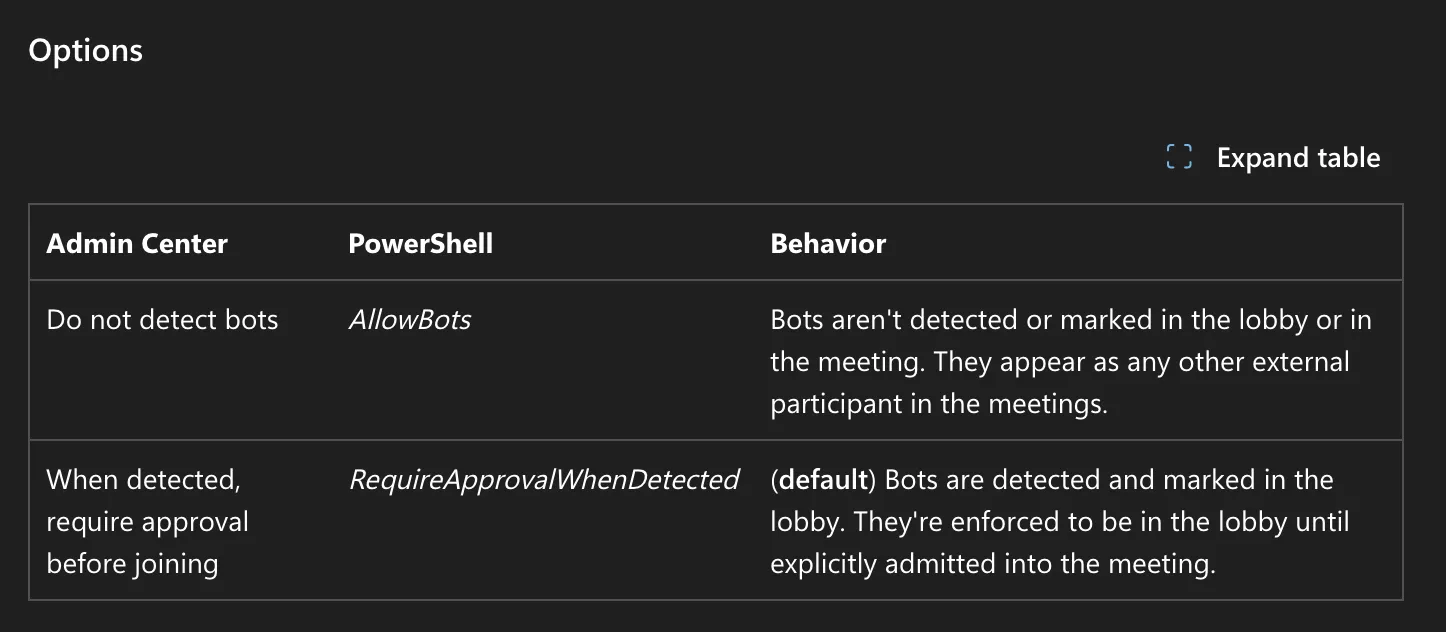
Meeting bots raise a different question. A tool that joins as a bot shows up in the participant list, and the host may have to let it in. Microsoft Teams now detects third-party bots, and by default a detected bot waits in the meeting lobby until an organizer admits it; the hosting organization’s admin can turn detection off (Microsoft Teams documentation). A tool that listens on the rep’s own computer adds no participant, so nothing in the call tells the prospect that coaching is running. Whether you have to tell them is a matter of law and company policy, which the next two sections cover.
Inside sales and high-volume outbound teams, in New York and elsewhere
Inside sales and high-volume outbound teams, in New York or anywhere else, make short calls where the first sentence and the price line decide the outcome. That changes what a live coaching tool has to do.
- Lock the opening line. Our founder’s rule is to script the first sentence word for word, because “the first sentence is when you’re most likely to ramble, and because that question sets up everything after it”. The price line gets the same treatment: “said flat, no cushion, no apology”.
- Start with a small objection library. Cold calls repeat the same handful of objections: “send me some info”, “we already use someone else”, “it’s too expensive”. Write the answer to each before the first coached call, and add the ones your reps keep losing to.
Opening line (word for word): [your first sentence] Price line (said flat): [your price sentence] Objection: "Send me some info." Answer: [your answer] Objection: "We already use someone else." Answer: [your answer] Objection: "It's too expensive." Answer: [your answer] Added after the first calls: [the objections your reps keep losing to] - Keep prompts short enough to absorb between two dials. “If the seller has to read it, it’s too much,” as our founder puts it. A card the rep can take in at a glance beats a paragraph while the prospect is mid-sentence.
- Check how your dialer connects. Power and parallel dialers can drop the rep into a call mid-greeting. The coaching tool has to be listening before the first word, so test it on your dialer’s real connect behavior, not on a scheduled Zoom.
Consent and notice come before the first coached call. The rules below are a starting point for the conversation with your counsel, not legal advice.
- Recording in New York: New York’s eavesdropping law treats overhearing or recording a conversation as an offense only without the consent of at least one party (New York Penal Law § 250.00), so in New York the consent of one participant on the call, such as the rep, meets that rule.
- Calls into California: California makes it an offense to record a confidential communication without the consent of all parties (California Penal Code § 632), and several other states take the same all-party approach. A New York floor that dials California prospects should plan for it.
- Monitoring your own employees: an employer with a place of business in New York State that monitors employees’ telephone conversations must give prior written notice upon hiring, have it acknowledged, and post it where employees can see it (New York Civil Rights Law § 52-c).
Whether live transcription counts as recording under each of these rules is exactly the question to put to your own counsel. SDRs and BDRs on cold calls are the sellers CallPrompter is built for first.
B2B sales teams in Zurich and the rest of Switzerland
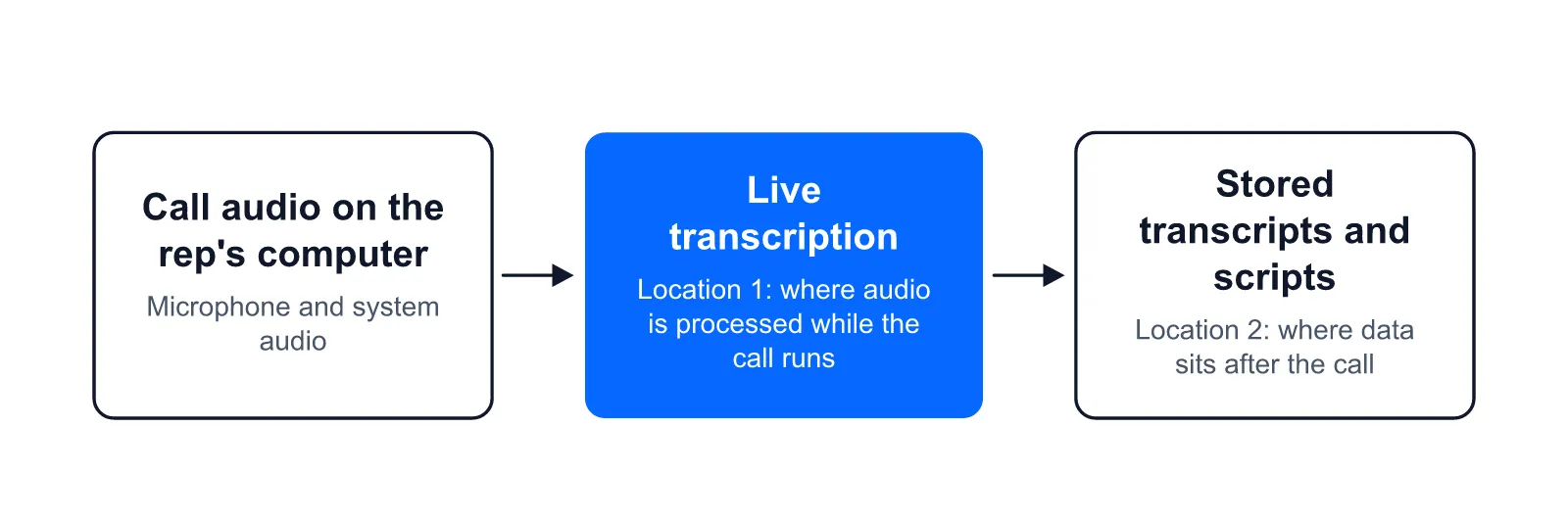
A Switzerland B2B sales team in Zurich runs into four checks that a New York team doesn’t. Calls often switch between Swiss German, Standard German, French and English, sometimes within one call, so test dialect on your own practice calls before you trust a language list. Where stored data sits and where live audio is processed are two separate locations, and a vendor should name both.
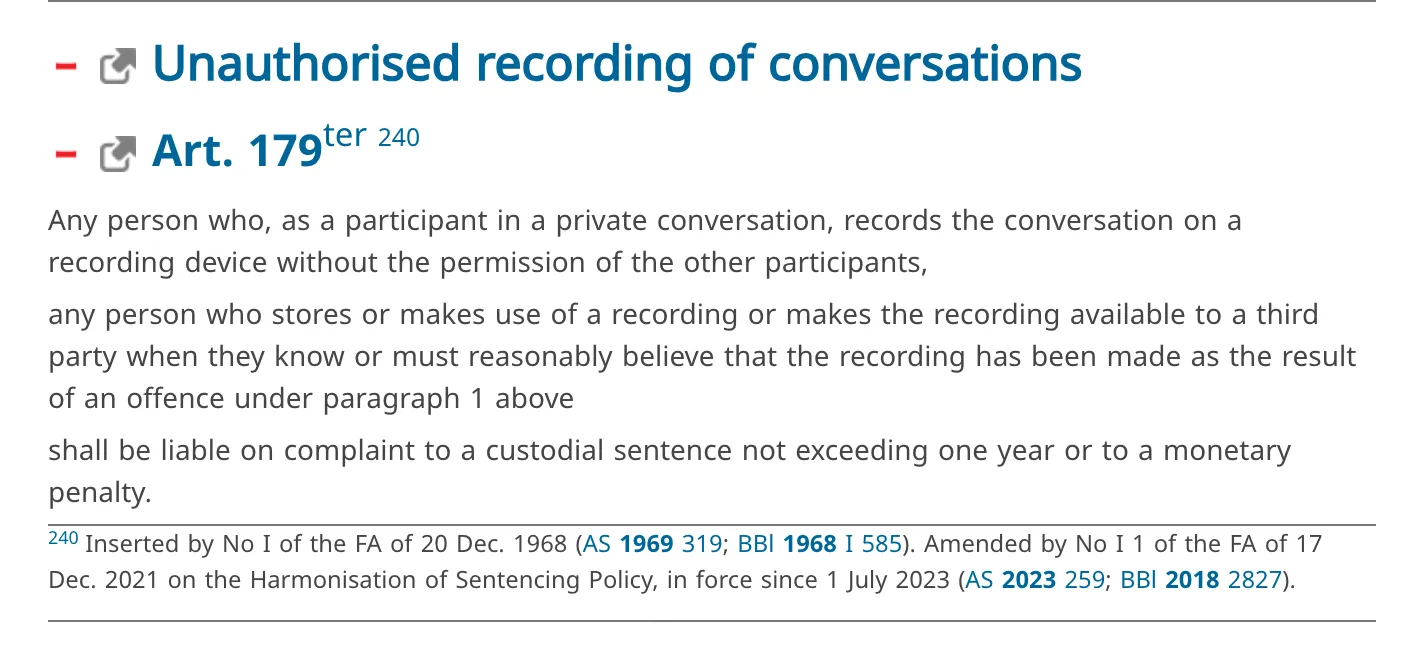
Under the Swiss Criminal Code (Art. 179ter), a participant who records a private conversation without the permission of the other participants can be prosecuted on complaint, so settle consent before the first coached call. And many tools in this category price in US dollars. The full Swiss checks, including VAT on US-dollar software and a two-week pilot, are in our eight checks for B2B teams in Switzerland.
The 12-question buyer’s checklist to take into every demo
Ask each vendor these twelve questions in this order. The first three rule tools out; the rest decide between the ones left.
- Does help appear during the call? A good answer is a demo of a prompt landing on a live call or a live practice call, not a summary that arrives afterwards.
- Which of our call setups does it hear (dialer, softphone, mobile, Zoom, Teams, Meet), and does anything join the call as a bot? A good answer matches your list setup by setup and gives a plain yes or no on bots.
- What happens on a call it cannot hear? A good answer names those setups and says what the rep sees then.
- Whose words appear on screen: answers our team wrote and approved, or text generated during the call? For an insurance team, the answer to “I already have cover” should be the one compliance approved, and a required disclosure has to come out word for word. A good answer shows where the approved text lives and who can edit it.
- How fast does a card appear, and how many words does it show? People answer each other quickly: a study of turn-taking in ten languages found the average gap between turns lasts only a fraction of a second, around 200 ms (Stivers et al., PNAS 2009), and a study of telephone calls found that after gaps of 700 ms or more, unwelcome answers such as refusals outnumbered welcome ones (Kendrick and Torreira, Discourse Processes 2015). A good answer is a latency figure with its method, and cards short enough to read in a glance.
- Does it follow meaning or keywords? On a SaaS demo, “That’s more than we budgeted for this quarter” is a price objection without the word “price”. A good answer is a tool that catches it in the demo.
- Does it handle our call languages and accents, tested on our own calls? A good answer is an offer to test on your calls. A language list says nothing about how a tool copes with your reps’ accents or a dialect.
- What does the prospect see and hear: screen shares, recordings, the participant list? And how does the prospect learn that the call is transcribed? A good answer covers each item and sends you to your own counsel on consent instead of promising you don’t need it.
- Where is live audio processed, where is data stored, and who are the subprocessors? A good answer names the two locations separately and lists the subprocessors. For teams in the EU, also ask whether any feature infers the emotions of your reps: the EU AI Act, Article 5(1)(f) prohibits AI systems that infer the emotions of a natural person in the workplace, except for medical or safety reasons.
- Who can open a rep’s transcript, what do managers see, and what goes into our CRM afterwards? A good answer names the roles that can open a transcript and says plainly whether anything is written back to the CRM.
- Can reps rehearse the same script before the live call? A good answer is practice on the same script and the same cards the rep will see live.
- What does it really cost (per seat or per team, minimum seats, commitment, what the trial covers), and what outcome proof comes with its basis (number of reps or calls, period, method)? A good answer is a published price per seat, the trial’s limits in writing, and any outcome figure with its n, period and method. If you’re one seller buying for yourself, ask whether a single seat can be bought without a team contract.
Our own answers to all twelve stand in the CallPrompter section below, so the checklist itself stays vendor-neutral.
How to test a live coaching tool on ten of your own calls in one week
One week and ten calls are enough to see whether a tool hears your calls and helps on them. Keep the test that small, or it never finishes.
- Days 1 and 2: load one real script with the opening line, the price line and the five objections your reps hear most. Run practice calls until the cards appear where they should.
- Days 3 to 5: run ten live calls across the setups your team really uses: the dialer, a mobile call answered on the computer, a Zoom or Teams meeting.
- On every call, judge three things separately: were the words transcribed, was the objection detected, and was the prompt right and short enough to use?
- Write down every call the tool could not hear, with its setup. That list often settles the decision on its own.
A sheet this simple does the job:
| Call | Setup | Words transcribed? | Objection detected? | Prompt right and short enough? | Notes |
|---|---|---|---|---|---|
| 1 | CRM dialer | Yes / No | Yes / No | Yes / No | |
| 2 | Mobile call on the laptop | Yes / No | Yes / No | Yes / No | |
| 3 | Zoom demo | Yes / No | Yes / No | Yes / No |
A tool that passes on seven of ten calls and fails on the same setup every time has told you exactly where it fits.
Where CallPrompter fits, and where it falls short
Where it fits
CallPrompter fits reps on mixed call setups who want their team’s own approved answers on screen, on calls that repeat: SaaS demos, discovery calls, cold calls and insurance or financial advice calls. Our founder built it after selling his own software with no sales training, which is why we design for the moment a seller blanks. One seller can buy a seat alone on Starter, the single-seller plan. On Pro, the per-seat team plan, a sales leader gets team script sharing, a shared objection library and a manager dashboard. When one rep’s rewritten answer to “that’s more than we budgeted for this quarter” works, the sales leader can share it, and it becomes the answer on every rep’s overlay.
Our answers to the 12 questions
| # | Question | Our answer |
|---|---|---|
| 1 | Help during the call? | Yes: questions, scripted objection answers and cues appear while the prospect is talking. |
| 2 | Which setups, and a bot? | Any call whose audio plays through the computer: Zoom, Teams, Google Meet, softphones, browser and CRM dialers, mobile calls answered on the computer. Nothing joins the call as a bot. |
| 3 | Calls it can’t hear? | A desk handset or a mobile call kept on the phone gets no coaching. |
| 4 | Whose words? | Yours: the response shown is the one written and approved in your script before the call. AI can write a first script, which you edit before any call. |
| 5 | How fast, how many words? | 485 ms from objection to response on screen, in CallPrompter’s own measurement; we have not yet published its method, call count or period. Cards are built to be short, few and far between. |
| 6 | Meaning or keywords? | Meaning: “That’s more than we budgeted for this quarter” is recognized as a price objection. |
| 7 | Languages and accents? | We can follow live calls in 90 languages; the app itself is in English, German and French. Test your own accents and dialects on practice calls first. |
| 8 | What the prospect sees? | The prompts are 100% invisible in screen shares and recordings, and no bot appears in the participant list. Nothing in the call tells the prospect, so consent is yours to settle with your counsel. |
| 9 | Data and processing? | Stored data (transcripts, scripts, account data) sits on servers in Switzerland. Real-time transcription is processed by a provider based in the United States, so audio leaves Switzerland while the call is running. No audio file is kept. |
| 10 | Transcripts and CRM? | The rep who made the call can open its transcript; on Pro, managers on the same team can too. Nothing is written back to your CRM. |
| 11 | Rehearsal on the same script? | Yes: AI practice mode runs the same scripts and cards against an AI buyer that interrupts and pushes back. |
| 12 | Cost and proof? | See the prices below. We publish no outcome figure. |
Where it falls short
CallPrompter is the wrong pick in a few cases, and we’d rather you hear them from us:
- A call whose audio never plays through the computer. Desk handsets and mobile calls kept on the phone can’t be coached.
- No CRM write-back. A Chrome extension can pull a contact from Salesforce, HubSpot, Pipedrive or LinkedIn into the app, but nothing goes back. Custom integrations are an Enterprise item, from 50 seats.
- Audio leaves Switzerland during the call. Stored data sits on servers in Switzerland, while real-time transcription runs through a provider in the United States.
- No published outcome figure. We have not measured a change in win rate, ramp time or meetings booked, and we won’t borrow an analyst’s number as if it applied to live prompts.
- A young product. We launched in March 2026, and there are few independent reviews so far.
- No live calls in the free trial. The trial covers the script tools and 30 minutes of AI practice, so the live days of the one-week test need Starter.
What CallPrompter costs
As of November 2026, CallPrompter costs:
| Plan | Price | What it covers |
|---|---|---|
| Free trial | $0 for 7 days, no credit card | Script tools, the AI script generator and 30 minutes of AI practice. No live call coaching. |
| Starter | $99 / month | One seller. 24 hours of live call coaching or AI practice per month, shared across both, with any number of calls. |
| Pro | $249 / seat / month | Unlimited live call coaching and AI practice, manager dashboard, team script sharing, shared objection library, priority support. |
| Enterprise | Custom, from 50 seats | Volume pricing, SSO, dedicated onboarding, custom integrations, uptime SLA. |
Prices exclude VAT and are billed monthly, with no annual commitment.
Frequently asked questions about real-time sales coaching tools
Does real-time sales coaching work on a desk phone?
Not through a tool that listens to the computer, because a desk handset’s audio never reaches it. Guidance built into the phone system can work on desk phones of that system, so ask that vendor to show it on one.
Can a live coaching tool work without joining the call as a bot?
Yes. A desktop app on the rep’s computer can listen to the system audio and the microphone, so no participant is added to the meeting. CallPrompter works this way on Zoom, Teams, Google Meet and phone calls that play through the computer.
How fast does a live prompt need to appear to be useful?
It has to land before the rep starts the reply, and in ordinary conversation replies start within a fraction of a second. Ask each vendor for its latency figure with the method behind it, and time the cards yourself on practice calls.
Does a team need both a practice tool and a live coaching tool?
Often yes, because rehearsal and live help solve different problems: one builds the answer before the call, the other puts it on screen during the call. Some tools run both on the same script; we compare the options for practice before the call and live help during it.
Is live coaching worth it for a team of three?
It is when the calls repeat: the same product, the same buyer type and the same handful of objections. A team of three can test that cheaply with monthly per-seat plans and the one-week test above before committing to anything.
Try it on a call you actually make
Other tools show you what went wrong after the call. CallPrompter helps you get it right while it’s happening. The quickest way to check that is one practice call against a persona (an AI buyer built on a customer you actually sell to), with your own opening line and your three hardest objections in the script. The 7-day free trial covers that call. If the cards land where you need them, move to Starter for one seller or Pro for the team, and run the ten-call test on your real setups.
Try for free. No credit card needed.
Questions before you download? Send a message through the contact page and the founder will get back to you.
Related posts
Real-Time Sales Call Coaching Software for B2B Teams in Switzerland: 8 Checks Before You Buy
How to Follow a Sales Script Without Sounding Scripted, Robotic, or Like You're Reading It