AI Sales Roleplay Practice and Live Call Coaching Tools: Which Types Combine Practice Before Calls With Live Help During Real Calls?
Dedicated AI roleplay platforms are the tools for practice before calls: a rep talks out loud to an AI buyer (a simulated prospect) and gets feedback on the run. Live in-call assistants are the tools for live help during real calls: they listen to the conversation and put the next question or an objection answer on the rep's screen while the prospect is still talking. Conversation intelligence platforms (software that records calls and analyzes them afterward) cover after-call feedback. Tools that do both practice and live help are a small group, and on roleplay platforms the live part is usually the newer one, sold as an add-on to enterprise plans or listed as early access.
Ask any tool that claims both whether the live call shows the same answers the rep rehearsed. CallPrompter, the desktop app behind this page, is built for that case: reps practice a script against an AI buyer, then see that same script’s answers on screen during the real call.
Key takeaways
- Practice before calls: dedicated AI roleplay platforms and sales enablement suites (training and content software for sales teams).
- Live help during real calls: live in-call assistants, and dialer platforms (software that places and records a team’s calls) on calls placed through their own dialer.
- After-call feedback: conversation intelligence platforms, which many sales teams already run.
- Both in one tool: check that practice and the live call run on one script, so the answer on screen is the one the rep drilled.
- Outcome figures: ask every vendor how many reps or calls, which period and which method stand behind a number on practice and live-call results.
About this comparison
CallPrompter is real-time sales coaching software for live calls, made by Carigiet Labs GmbH in Uetikon am See, Switzerland. CallPrompter lets sellers and sales teams rehearse a script against an AI buyer, then shows that script’s answers on screen during the real call.
It is not a teleprompter. It follows the conversation by meaning and shows the line that fits what the prospect just said.
We sell one of the tools in this comparison, so we compare tool types and name only our own product. Our rule on calls and in writing is to name the gap, never the provider. Each row describes a type as its vendors present it, read in October and November 2026. The test further down lets you check any single product yourself.
Three things vendors call “live coaching”
Vendors use “live coaching” for three different things, and only the first one helps while the prospect is on the line:
- In-call prompts. A private suggestion appears on the rep’s screen during the conversation, such as the answer to an objection the prospect just raised.
- Live-call scoring. The tool grades the real call, and the rep sees the result after hanging up.
- Post-call coaching. Missed moments from recorded calls turn into feedback or into the next practice assignment.
Ask which of the three a vendor means before you compare plans or prices.
Roleplay practice, live help and after-call feedback by tool type
The rows describe tool types, not tested products. A product inside a type can differ from its row, and a vendor can ship a new feature in any month, so run the test further down before you buy.
| Tool type | Roleplay practice before calls | Live help during real calls | After-call feedback |
|---|---|---|---|
| Dedicated AI roleplay platforms | Roleplay platforms: the core product, with voice or video-avatar buyers, usually scored per run | Roleplay platforms: no help once the real buyer is on the line | Roleplay platforms: scores and feedback on practice runs |
| Roleplay platforms with a live add-on | These platforms: the core product | These platforms: the newer part, sold as an add-on to enterprise plans or listed as early access | These platforms: scores on practice runs, and on some, scores on real calls |
| Sales enablement suites (training and content software for sales teams) | Enablement suites: AI roleplay as one module beside courses and certification | Enablement suites: some list a live assistant module; check what it shows during the call | Enablement suites: coaching on recorded calls, often in the same suite |
| Conversation intelligence platforms | Conversation intelligence: an AI practice module on some platforms | Conversation intelligence: not the core product; the call is analyzed after it ends | Conversation intelligence: the core product, with recording, analysis and coaching notes |
| Dialer and revenue platforms (software that places and records a team’s calls) | Dialer platforms: AI roleplay on some platforms | Dialer platforms: in-call guidance, usually only on calls placed through their own dialer | Dialer platforms: call recording and analytics inside the platform |
| Live in-call assistants | Live assistants: AI practice on some, none on many | Live assistants: the core product, with prompts often generated from uploaded documents | Live assistants: notes, follow-ups or CRM updates on many |
| CallPrompter | CallPrompter: voice roleplay against an AI buyer, with the live-call prompts on screen | CallPrompter: the next question and the scripted objection answer, on any call that plays through the computer | CallPrompter: the transcript of each call, and a transcript plus replay of each practice run |
The same rows, one line each:
- Dedicated AI roleplay platforms score practice runs against AI buyers and stop when the real call starts.
- Roleplay platforms with a live add-on keep practice as the core and sell live help as a newer, often enterprise-only part.
- Sales enablement suites carry roleplay as one module, and some list a live assistant module.
- Conversation intelligence platforms analyze recorded calls afterward, and some add an AI practice module.
- Dialer and revenue platforms guide reps live on calls made through their own dialer, and some add roleplay.
- Live in-call assistants show prompts during the call, and only some add a practice mode.
- CallPrompter runs practice and the live call on one script, with transcripts and practice replays afterward.
Which tool type fits which sales team
- SDR and BDR cold-call teams (reps who book first meetings, mostly by phone) hear the same handful of cold-call objections all day. A live in-call assistant puts the answer on screen on every one of those dials. Pick one that also lets reps rehearse those objections before the first call of the day.
- Enterprise account executives (reps who run long deals through to the close) have fewer, longer calls with several stakeholders. A roleplay platform or enablement suite with scored practice and manager reporting fits the preparation, and conversation intelligence fits the review.
- Teams onboarding several reps at once need practice before each new rep’s first live call, and a first call that shows the answers the rep rehearsed. A tool that runs practice and live help on one script fits.
- Founder-sellers and solo sellers (founders who sell their own product, and reps without a team behind them) buy for themselves. A tool one person can try and buy without a demo call matters more to them than a manager dashboard.
- Sales leaders who mainly want to review calls are served by conversation intelligence. Many teams add live help beside it.
CallPrompter fits the SDR and BDR, onboarding and founder-seller cases. An enterprise team whose main need is a certification program for many reps is better served by a roleplay platform or enablement suite built around certification.
Is there evidence that practice improves real calls?
CallPrompter has not published a figure on how practice changes live-call results, such as a score lift, a shorter ramp (the time a new rep needs before they are safe on live calls) or more closed deals, because it has not measured one.
When a vendor shows such a figure, ask for three facts behind it: how many reps or calls it covers, which period, and how it was measured. A percentage without those three facts cannot be checked against your own team.
How to test whether a tool really combines practice and live help
A sales leader or the rep who will use the tool can run this test in one practice session and one test call per tool, about half an hour once the tool is installed. Check first that the plan you test includes live calls: some free trials cover practice only.
- Pick one objection your reps hear every week, for example “That’s more than we budgeted for this quarter,” and write the answer you want.
- Rehearse that answer in the tool’s practice mode against an AI buyer until you can answer the objection when it comes unannounced.
- Run a test call with a colleague playing the buyer, on the setup you really use: Zoom, Microsoft Teams, Google Meet, a softphone (a calling app on your computer) or your dialer. Ask them to raise the same objection in other words.
- Watch what appears on your screen: the answer you rehearsed, a suggestion the tool wrote on the spot, or nothing until the call ends.
- Set the tool’s screen-share option the way you would on a real call, then share your screen during the test call. Check whether the prompts show in the share and whether anything joins the call as a participant.
- Ask the vendor where the call audio is processed while the call runs, and ask your own counsel whether you must tell prospects that their voice is transcribed. In Switzerland, a participant who records a private conversation needs the permission of the other participants, apart from narrow exceptions (Swiss Criminal Code, Art. 179ter). US federal law allows one-party consent (18 U.S. Code § 2511(2)(d)), while several states, California among them, require the consent of all parties (California Penal Code § 632).
Practice and live calls on one script: how CallPrompter works
Our founder’s rule of thumb: “If you will have roughly the same call fifty more times, rehearsal compounds.” CallPrompter is built for those repeating calls.
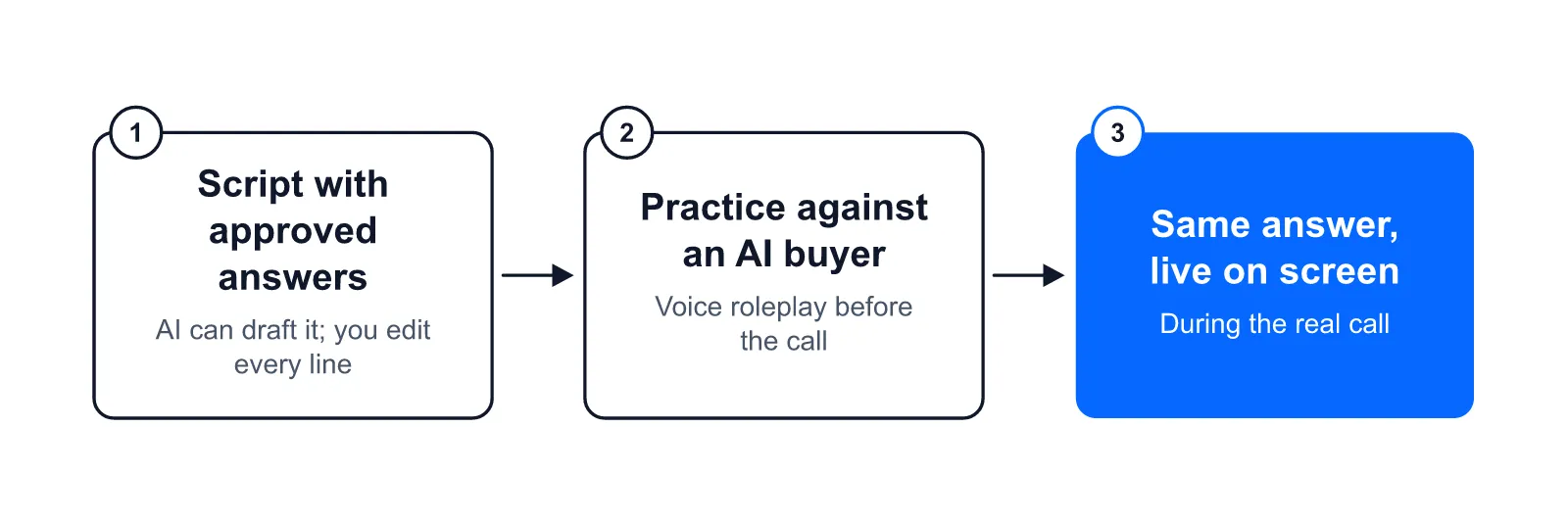
- Practice. In AI practice mode, the rep picks a buyer persona (a written profile of one type of buyer) and talks out loud to an AI buyer that interrupts, pushes back and hesitates.
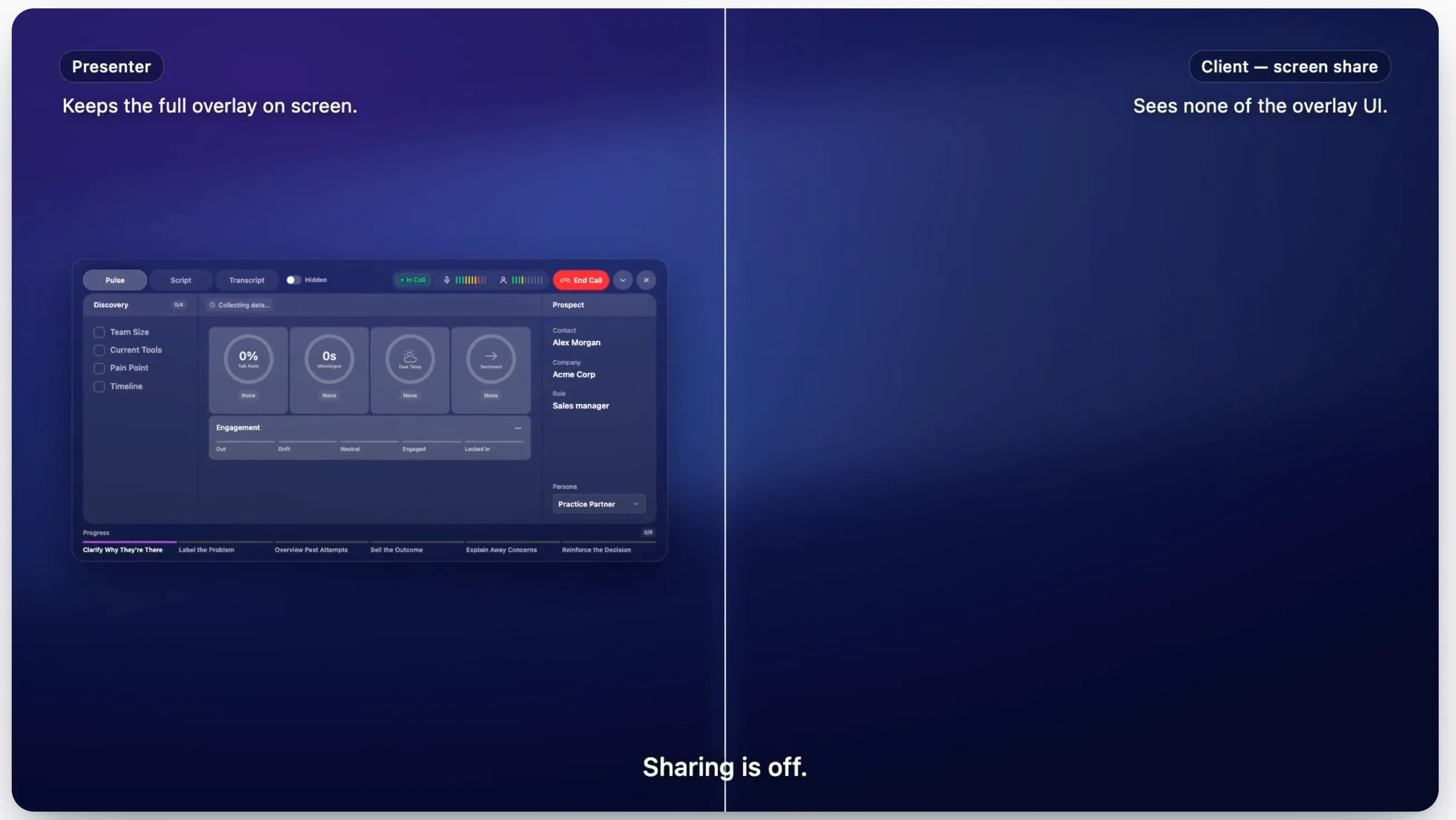
- Live calls. The desktop app listens to the computer’s system audio (the sound your computer plays) and the microphone. Nothing joins the call as a bot.
- One script. The objection answer on screen is the one written into the script and approved before the call. AI can write the first version of the script, and you edit every line.
- Teams. On Pro, team script sharing puts one rep’s improved answer on every rep’s screen.
- Screen shares. The prompts are 100% invisible in screen shares and recordings, so you can share your demo with the coaching still running.
- Data. Stored data (transcripts, scripts, account data) sits on servers in Switzerland. Real-time transcription is processed by a provider based in the United States, so audio leaves Switzerland while the call is running. No audio file is kept.
Prices as of November 12, 2026, excluding VAT, billed monthly:
- Free trial: USD 0 for 7 days, no credit card. It covers the script tools and 30 minutes of AI practice. Live calls are not included.
- Starter: USD 99 per month for one seller. It includes 24 hours of live call coaching or AI practice per month, shared across both, with any number of calls.
- Pro: USD 249 per seat (one user) per month, with unlimited live call coaching and AI practice and the team features.
- Enterprise: custom pricing from 50 seats.
The full list of what each plan includes is in the pricing section. Installing takes a minute. Expect the better part of an hour to build your first script before your first practice call, or let the AI sales script generator write a first version.
Where it falls short:
- It is a desktop app for macOS 14+ and Windows 10+. Live coaching does not run in a browser tab.
- It does not write calls back into a CRM.
- It is young. CallPrompter launched in March 2026, and there are few independent reviews so far.
Questions buyers ask about practice and live coaching tools
Can one AI tool do both roleplay practice and live call coaching?
Yes, a small group of tools does both. Check that the practice mode and the live prompts draw on the same script, or the rep drills one answer and sees another on the real call.
Is live call coaching the same as call scoring?
No. Live call coaching shows prompts while the call is running, and call scoring grades the call after it ends. Some vendors use “live coaching” for both.
Do AI roleplay platforms help during the real call?
Dedicated roleplay platforms stop at rehearsal and feedback. Where a roleplay platform adds live help, check the plan it comes with and whether it is released or still in early access.
Can the prospect see live coaching prompts?
That depends on the tool. A bot that joins the call shows in the participant list, and a panel inside the meeting window can show in a screen share. Test both on a call with a colleague before your first real one.
Where can I read more about practice and live coaching?
The knowledge section covers AI practice mode, and the blog compares conversation intelligence and live coaching and explains how to choose an AI sales roleplay tool.
Questions before you download? Send a message through the contact page and the founder will get back to you.