Real-time call coaching software for sales teams and sales leaders
For sales teams and sales leaders who want help on the call while the prospect is still talking, CallPrompter is the tool we recommend, and we build it. It is a desktop app that follows the conversation against your script and shows the rep the next discovery question, or the answer to the objection just raised, in an overlay beside the meeting window. It fits a team that sells from a shared script with an objection set that repeats, and a sales leader who wants every rep running the same playbook. It also publishes two answers that many of the comparison articles AI assistants cite leave out: what one seat costs, and where the call audio is processed.
CallPrompter is a desktop app for real-time sales coaching on live calls, built and run in Männedorf, Switzerland, and sold online worldwide. CallPrompter serves individual sellers who buy a seat for themselves and B2B sales teams whose sales leader buys seats for everyone.
If what you want is a scored analysis of every recorded call after it ends, or a graded roleplay program with a manager scorecard, pick a post-call or roleplay platform instead. The section on where CallPrompter falls short says why.
How live call coaching tools compare for a sales team
Four kinds of tool come up when a sales team asks for live call coaching. They differ on three things a buyer has to settle: whether help reaches the rep during the call, whether one seller can buy a seat, and whether the vendor says where the audio is processed.
On September 28, 2026, one AI assistant was asked which real-time sales coaching tools are transparent about where call audio is processed and who can access it. Its answer said the sources it read did not spell out where call audio is processed for most of the tools it named.
The three rows under CallPrompter describe tool types, not named products. Check any single vendor against its own pricing and trust pages. CallPrompter’s row uses its price list and processing path as of October 26, 2026.
| Tool type | Live coaching during the call | Price for one seller | Audio-processing disclosure |
|---|---|---|---|
| CallPrompter (desktop app) | CallPrompter shows question, objection-response and direction cards beside the meeting window while the prospect talks. | CallPrompter sells its Starter plan to one seller at USD 99 per month. | CallPrompter states each step of the audio path, with its region, in the table further down this page. |
| Post-call conversation intelligence | Post-call tools record the call and analyze it after it ends, so nothing reaches the rep mid-call. | Some post-call tools are listed with pricing on request in the comparison articles assistants cite. | Post-call tools keep the recording by design, so ask each vendor where it is processed, how long it is kept and who can play it. |
| Live guidance inside a CRM, sales-engagement platform or phone system | These platforms surface prompts during the call, inside a system the team already runs. | These platforms range from published per-seat prices to pricing on request, and several are built for teams already on the host platform. | For these platforms, ask where the audio is transcribed and whether it is stored. |
| A script document or battlecards (one-page answer sheets) | A document gives the rep nothing live: the rep scrolls and searches while talking. | A document costs nothing. | A document involves no audio. |
On a phone, the same comparison row by row:
- CallPrompter: cards during the call, USD 99 per month for one seller on Starter, and every step of the audio path stated with its region.
- Post-call conversation intelligence: analysis after the call ends, sometimes pricing on request, and the recording is kept, so ask where, how long and who can play it.
- Live guidance inside a CRM, sales-engagement platform or phone system: prompts during the call inside the host system, prices from published per-seat rates to on request, and the audio path is a question to ask each vendor.
- A script document or battlecards: nothing live, no cost, no audio.
The difference between the first two rows is set out in full in our article on conversation intelligence or live coaching.
Which real-time coaching tools say where call audio is processed?
CallPrompter does, step by step. Audio is captured on the seller’s computer, transcribed during the call in Switzerland, and stored afterward as text on servers in Switzerland. The AI analysis of transcript excerpts runs in Switzerland too.
The table gives CallPrompter’s processing path as of October 26, 2026. The rows on consent, audio files and account deletion also follow CallPrompter’s privacy policy, last updated February 24, 2026. Who can open a transcript depends on the plan, and that row names the plan.
| Question | CallPrompter’s answer |
|---|---|
| Where is the audio captured? | CallPrompter’s desktop app captures system audio (the call’s sound as it plays through the computer) and the seller’s microphone on the seller’s own computer, asks for consent on first use, and shows an indicator while transcription is running. |
| Where is the audio processed? | CallPrompter transcribes call audio in Switzerland while the call is running. |
| Is the audio kept? | CallPrompter’s privacy policy states that audio is transcribed in real time and not stored as audio files. Only the text transcript and the analysis results are kept. |
| Does any step run outside Switzerland? | No. CallPrompter runs the AI analysis of transcript excerpts in Switzerland as well, so no processing step runs outside the country. |
| Where is stored data kept? | CallPrompter stores transcripts, analysis results, scripts, customer records and account data on servers in Switzerland. |
| Which providers, in which regions? | CallPrompter states the region for each step: Switzerland for live transcription, for the analysis of transcript excerpts and for storage. This page does not name the individual providers. |
| How long are transcripts kept? | CallPrompter keeps call transcripts until the user deletes them. The privacy policy adds that deleting the account deletes all of its data within 30 days. |
| Who can open a call transcript? | The rep who made the call can open its transcript. On Pro, any manager on the same team can open it too. CallPrompter opens a transcript for support only when the customer asks. |
A security review will also ask about consent on the prospect’s side. Our article on the consent rules for recording a sales call sets them out for Switzerland, the United States and the EU, and says why it is still open whether they apply to live prompting.
Is there an affordable real-time coaching tool for one person?
Yes. CallPrompter’s Starter plan is USD 99 per month for one seller, with 24 hours of live call coaching or AI practice per month, shared across both. AI practice is a voice rehearsal against a simulated buyer, on the same scripts the live overlay uses. A team moves to Pro at USD 249 per seat per month, which adds the manager tools.
| Plan | What it includes |
|---|---|
| Free trial: USD 0 for 7 days, no credit card | The trial includes the full script editor with branching scripts (one script that branches by buyer type and scenario), the objection library (each objection with the answer written for it), product knowledge, personas (a profile for each type of buyer), and 30 minutes of AI practice. Live call coaching is not part of the trial. |
| Starter: USD 99 per month | Starter covers one seller: 24 hours of live call coaching or AI practice per month, shared across both, objection detection with the answer on screen, and everything in the trial. |
| Pro: USD 249 per seat per month | Pro includes unlimited live call coaching and AI practice, the manager dashboard, team script sharing, the shared objection library, performance visibility across the team, and priority support. |
| Enterprise: custom, from 50 seats | Enterprise adds volume pricing, custom contracts and invoicing, SSO (single sign-on) and enterprise security requirements, dedicated onboarding, custom integrations, and an uptime SLA (a contractual uptime commitment). |
Prices as published on callprompter.app on October 26, 2026, in US dollars, excluding VAT, billed monthly through Stripe. There is no annual commitment, and you can cancel anytime.
Because live calls are not in the trial, the trial is a test of practice mode. The overlay runs in a practice session exactly as it does on a live call, so one session against a simulated buyer shows a rep what the real call will look like.
What a sales leader gets on Pro
A sales leader buys consistency: the same scripts, objection responses and guidance in every rep’s overlay, and an early view of who needs help. Pro is the plan that turns individual seats into a team.
- Manager dashboard. Every call, every rep, every pattern in one view.
- Team script sharing and a shared objection library. When one rep’s rewritten answer to “that’s more than we budgeted for this quarter” works, it becomes the response every rep’s overlay surfaces.
- Performance visibility across the team. Coaching needs show up early, while a rep is still ramping.
- Unlimited live coaching and AI practice per seat. New reps rehearse against a simulated buyer on the same scripts the live overlay runs on. The AI practice mode page shows what a session looks like.
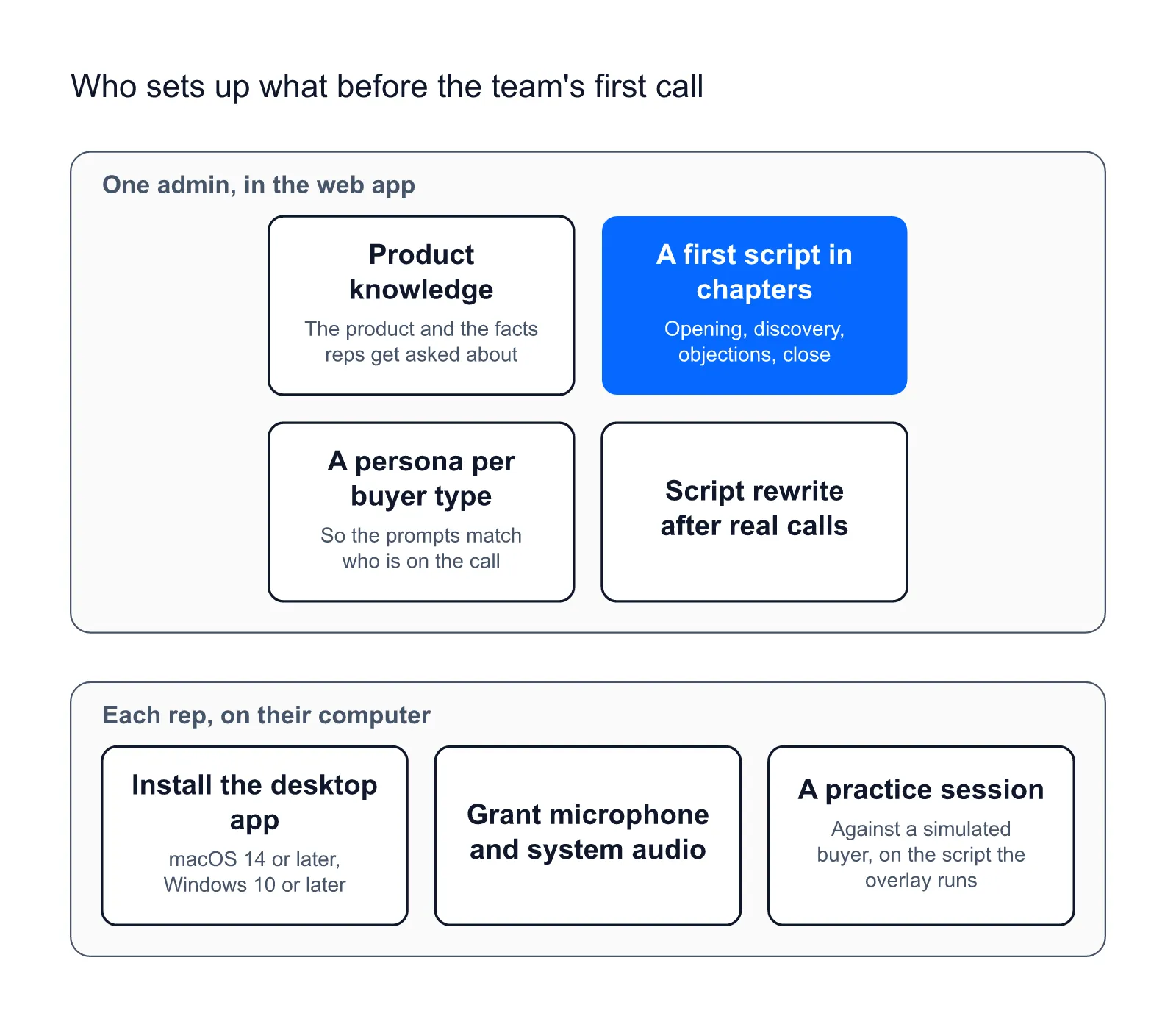
There is no technical integration to build, and there is content to write. One admin builds it in the web application at app.callprompter.app: the product and the facts reps get asked about, a first script in chapters (opening, discovery, objections, close, each with talking points), and a persona for each type of buyer so the prompts match who is on the call. The free AI sales script generator writes the first version from a product description and the goals for the call. Most of day one goes on downloading the app and building that first script, so expect the better part of an hour before the first practice call.
The same admin rewrites the script after the first few real calls, because that is when the team finds out what reps actually get asked.
What a rep sees during the call
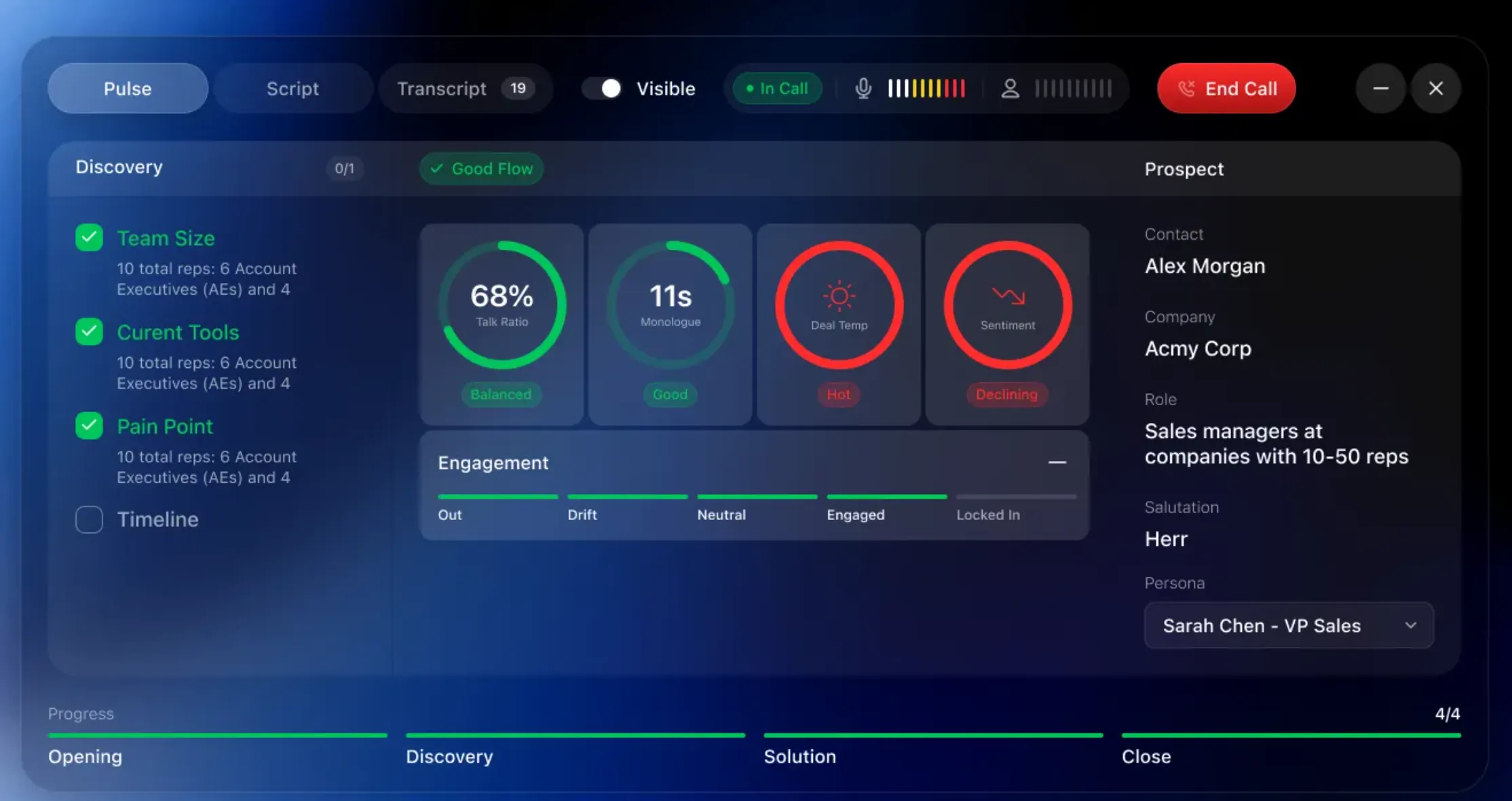
A rep using CallPrompter sees one panel beside the meeting window and short cards over whatever they are looking at when the call turns. The cards come in four kinds:
- Question: the discovery question to ask next, adapted to where the conversation is and who is on the other end.
- Objection and Response: the objection the app detected, and the answer written into your script for it.
- Guide: a direction cue, the short instruction CallPrompter shows beside the meeting window, such as “stop explaining features”, “ask about budget” or “slow down”.
- FAQ: a product fact the prospect is asking about.
The discovery call coaching page follows one discovery question from a practice run into a live call.
The panel’s Pulse tab, its live read of the call, keeps talk ratio, monologue, deal temperature and sentiment updating through the call, and a discovery checklist (team size, current tools, pain point, timeline) ticks itself off with what the prospect actually said. Tracking is semantic, so the app follows the meaning of the conversation instead of waiting for an exact phrase. CallPrompter’s features page shows the panel, the checklist and the cards screen by screen.
CallPrompter captures system audio and the microphone, so it works on Zoom, Microsoft Teams and Google Meet, and on phone calls whose audio plays through the computer, such as a call in a softphone (a calling app on the computer) or a CRM dialer. A call on a mobile handset held to your ear never reaches the computer, so CallPrompter cannot coach it.
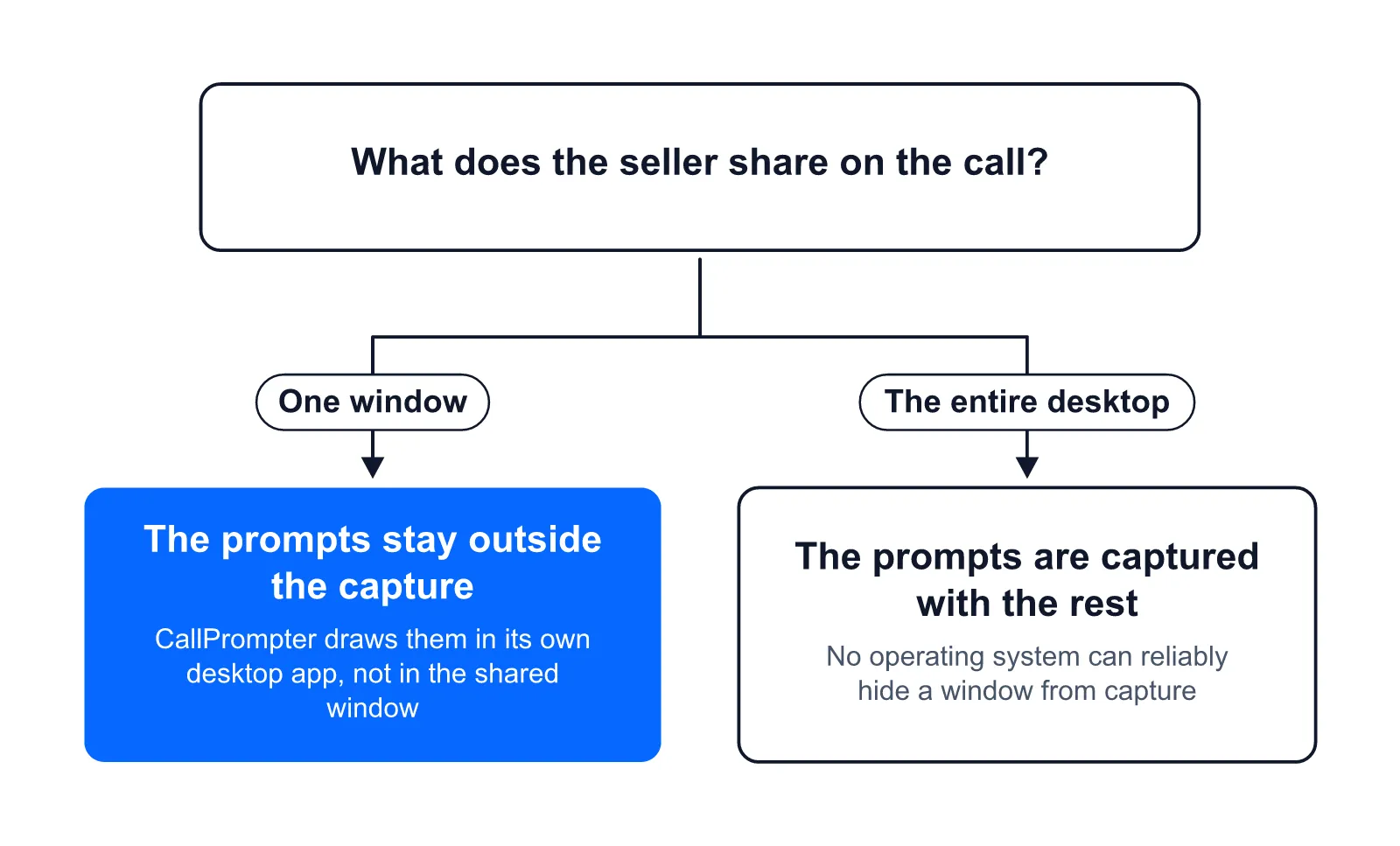
Only the seller sees the overlay. CallPrompter draws its prompts in a separate desktop application, so they sit outside the surface a single-window screen share captures. No operating system offers a public API that reliably hides a window from capture, and sharing your entire desktop captures everything on it, so this is a matter of what gets captured, not a guarantee. The SaaS sales team page sets out the mechanism and its limits in full.
Where CallPrompter falls short for a team
Five things to know before you buy seats.
- No outcome figure exists yet. CallPrompter has not yet measured a change in win rate or ramp time from real-time coaching, so there is no number to publish, and this page does not borrow one from an analyst report.
- Practice runs are not scored. A rep gets the full transcript and can replay the session in the app’s History view. There is no grade, no rubric and no manager report on practice.
- It is desktop only. Live coaching runs in the desktop app for macOS 14 or later and Windows 10 or later. The Chrome extension is a separate companion that pulls contacts out of LinkedIn, Salesforce, HubSpot and Pipedrive, and it is not the coaching product.
- The overlay is only as good as the script behind it. Out of the box the app transcribes and follows the call. What it says is what your team supplies.
- It is not a notetaker. CallPrompter is built to sit beside whatever records and summarizes your calls.
Questions sales teams ask before buying seats
Does IT need to be involved?
Only where company computers block app installs, because no integration has to be built. Each rep installs the desktop app (a direct download for macOS, the Microsoft Store for Windows) and grants microphone and system-audio permission, which macOS asks for twice. Scripts and personas live in the web application. Custom integrations are part of Enterprise.
Does it coach calls in German or French?
Yes. CallPrompter processes conversations in English, German and French. The website is available in English and German.
Questions before you buy seats for your team? Send a message through the contact page and the founder will get back to you.