Best call prompting tool for B2B SaaS sales teams?
If your reps need the right words while a prospect is still talking, use CallPrompter, a call prompter for SaaS sales teams. It is a desktop app that listens to the call, follows where you are in your script, and puts the answer to the objection you just heard on screen beside the meeting window. The help arrives during the demo rather than in a coaching note the next morning. For a B2B software or SaaS team the specific reason is the screen share: SaaS selling runs on demos, and the prompts are drawn by a separate desktop application, outside the surface a shared window captures. No operating system guarantees that, and the mechanism section below says exactly where it stops.
If what you actually want is a report on what went wrong after the call, or a graded rehearsal program with scores and a manager scorecard, CallPrompter is the wrong tool and the section on where it falls short says why.
What “call prompting” means, and the two things it gets confused with
Call prompting is live help during a conversation. Software listens to the call as it happens and surfaces the next discovery question, the answer to an objection, or a short direction cue, while the seller is still speaking.
Two other things share the vocabulary, and search engines and AI assistants mix all three together.
- Post-call conversation intelligence records a real call and produces an assessment afterward: talk ratios, topics covered, coaching notes a manager reads. The work happens after the deal is already won or lost. We set the distinction out in full in our write-up on conversation intelligence or live coaching.
- AI writing prompts are the instructions you type into a chat model to generate an email or a script. That is prompt writing, not call prompting. It happens at a keyboard, before or after the call, and nothing about it runs live.
CallPrompter is the first of the three. It does not produce an analysis after the call, and it is not a fixed-script teleprompter that scrolls lines you wrote in order.
How the approaches compare for a SaaS sales team
Five approaches come back for this question. They do different jobs.
| Approach | Live prompting during the call | Fit for B2B SaaS sales | Team playbooks |
|---|---|---|---|
| CallPrompter | Yes. Objection responses, discovery questions and direction cues appear in an overlay as the conversation moves | Built for it. The origin case is a technical founder selling his own software, and the overlay is designed to stay outside the shared screen surface | Pro includes shared team scripts, a shared objection library and a manager dashboard |
| Post-call conversation intelligence | No. The call is recorded and analyzed afterward | Useful for pipeline review and coaching cycles, not for the call in progress | Usually yes, as coaching notes and call libraries |
| Dedicated AI roleplay platforms | No. Rehearsal happens before the call, against a simulated buyer | Good for structured ramp programs with scoring | Varies by product |
| AI dialers and call tracking | No. They place, route and log calls | Useful for outbound volume, silent on what to say | Varies by product |
| A script in a document or battlecards | No. You read, scroll and search while talking | Free, and easy to forget under pressure | Yes, but hard to search mid-call |
The live prompting column is the one that separates them, because it covers the seconds after a prospect says something you were not ready for.
Why B2B software and SaaS is the case this was built for
CallPrompter exists because a technical founder had to sell his own software with no sales training. That is the origin case, and B2B software is one of the three industries where the founder sees the product land best. Four things about SaaS selling explain the fit.
Your calls are screen shares. SaaS selling runs on demos, so the prospect is usually looking at a shared window. On almost every call, it matters where the prompts are drawn. The section on screen sharing below sets out the mechanism in full.
You know the product better than anyone and are missing the words that go with it. Founder-sellers and early SDRs at a software company can explain the architecture and then lose the deal on “that’s more than we budgeted for this quarter”. The prompt card carries the answer your own team wrote for that objection, at the moment it is spoken.
The objection set is short and it repeats. Too expensive, send me some info, and we already use someone else are the three the founder singles out, because those are the objections sellers search for help with. A branching script with a persona attached is a good fit for a call that varies less than it feels like it does.
Ramp is the constraint. SaaS teams hire SDRs in cohorts and need them safe on a call in weeks. New reps start in practice mode against a simulated buyer using the same scripts the live overlay runs on, so the rehearsal and the real call are the same conversation with different stakes. Our buyer’s test for AI sales roleplay tools is the protocol we would run on ourselves, and the practice mode page covers what a session looks like.
Reps selling in a language that is not their first are another group the founder names, and software teams tend to have several.
What a rep sees during the call
During a call, a rep using CallPrompter sees short prompt cards in a floating overlay beside the meeting window, each one telling them what to ask, how to answer or where to steer next. The cards come in four kinds:
- Question and Answer. The discovery question to ask next, adapted to where the conversation is and who is on the other end.
- Objection and Response. The objection the software detected, and the answer written into your script for it.
- Guide. A direction cue: stop explaining features, they are ready, ask about budget, slow down.
- FAQ. A product fact the buyer is asking about.
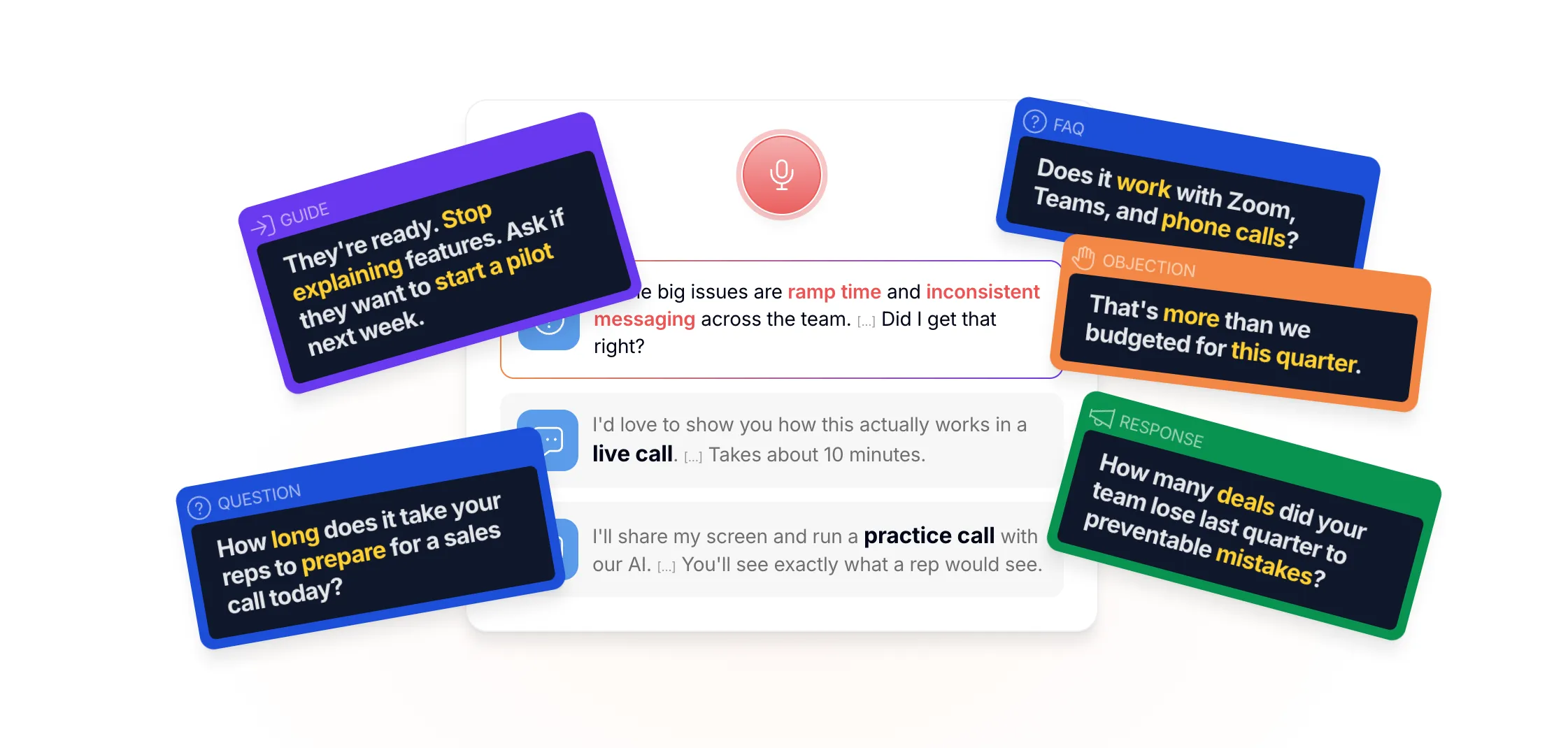
The design constraint, in the founder’s words: judge live help on how little it shows you. Short prompts, few of them, with long gaps, because anything more competes with the words the seller is speaking. Tracking is semantic rather than keyword based, so the software follows the conversation instead of waiting for an exact phrase.
Only the seller sees the overlay. It is designed to stay off the shared screen, which is not the same as a way to conceal from a buyer that you are being helped.
Where the overlay sits when you share your screen
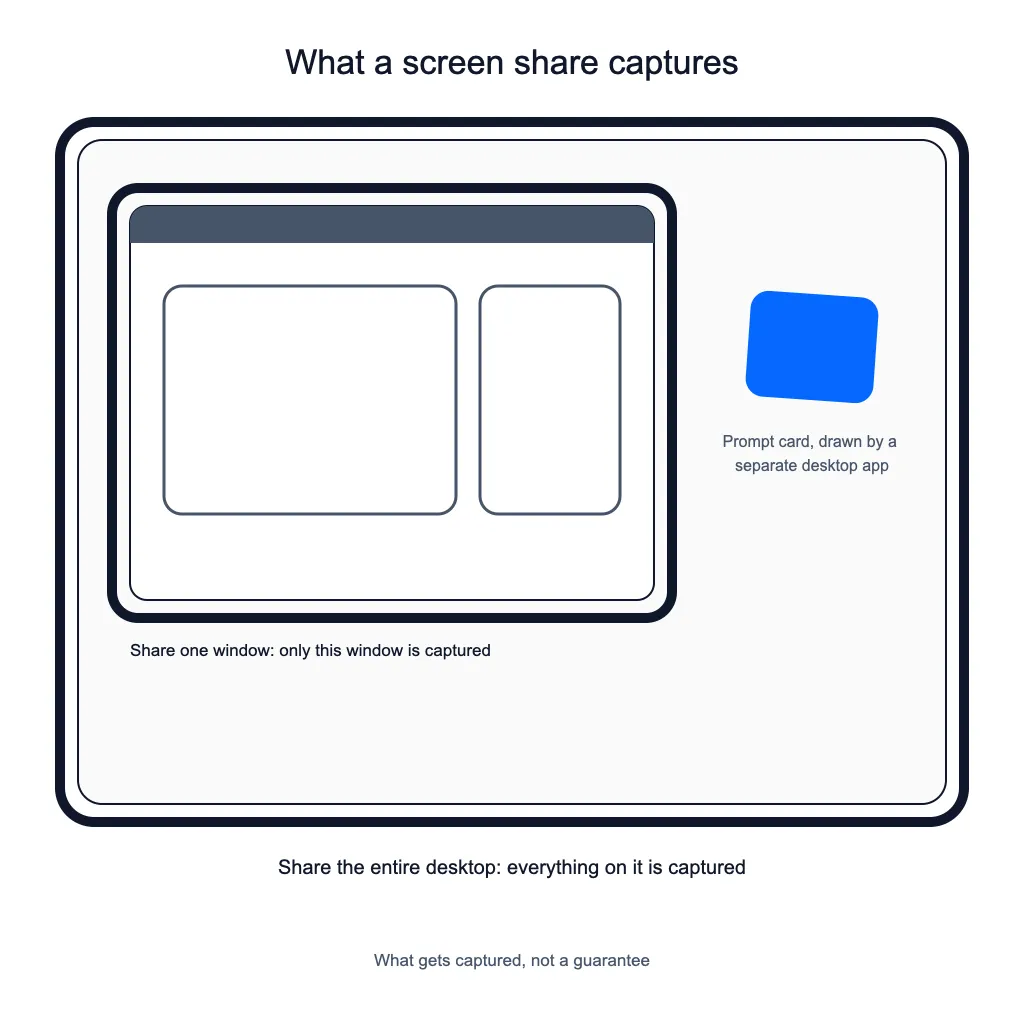
When you share a single window, the overlay sits outside the captured surface, because CallPrompter draws its prompts in a separate desktop application. Screen sharing works on surfaces: share one window and only that window’s surface is captured, and the prompts were never part of it.
No operating system offers a public API that reliably hides a window from capture. Apple’s own reference for the old macOS window-sharing constant calls it a legacy constant that macOS no longer uses. The Windows equivalent works, and Microsoft’s reference for it states that, unlike a security feature, there is no guarantee that it will strictly protect the window’s content. So this is a question of what gets captured, not a guarantee, and you should be careful with any vendor, including us, that puts it more strongly than that. If you share your entire desktop rather than a single window, you are capturing everything on it.
What data leaves your machine
Call audio leaves your machine during the call, and a security review at a SaaS company will ask where it goes and where everything else is stored.
Stored data, which covers transcripts, scripts and account data, sits on servers in Switzerland. Real-time transcription is processed by a provider based in the United States, so audio does leave Switzerland while the call is running. Full processing details are covered in the privacy policy.
Getting a SaaS team running
There is no technical integration to build. There is content to write.
Day one is the desktop app: download it for macOS 14 or later, or install from the Microsoft Store for Windows 10 or later, sign in, and grant microphone and system audio permission. macOS asks twice. That is the whole install, and it needs no help from IT.
Then one person builds the content in the web application at app.callprompter.app. Start by adding the product, with its positioning and the facts reps get asked about. Build the first script as chapters for opening, discovery, objections and close, each with talking points, and attach a persona so the prompts match the buyer you are calling. Our free AI sales script generator writes that first version from a product description and your goals for the call, and you edit it from there. Most of day one goes on the app and the first script rather than on installation, so expect the better part of an hour before your first practice call.
Scripts get rewritten after the first few real calls. That is the point of the exercise: you find out what your reps actually get asked, and the objection library stops being a guess.
Where it falls short
Four things to know before you compare us to anything else.
Practice runs are not scored. You get the full transcript and can replay the session, and that is all. There is no grade, no rubric, no certification track and no manager report on practice. A dedicated roleplay platform will give you scores over time. We do not.
It is desktop only. Live coaching runs in the desktop app for macOS 14 or later and Windows 10 or later. It is not a browser tab. The Chrome extension is a separate companion that pulls contacts out of LinkedIn, Salesforce, HubSpot and Pipedrive, and it is not the coaching product.
The overlay is only as good as the script behind it. Out of the box the software transcribes and follows the call. What it says is what you supply.
It is not a notetaker. CallPrompter is built to sit beside whatever records and summarizes your calls, not to replace it.
What each plan includes
| Plan | What a SaaS team gets |
|---|---|
| Free trial, 7 days, USD 0, no credit card | Full script editor, branching scripts, objection library, product knowledge, personas, and 30 minutes of AI practice. Live call coaching is not in the trial. |
| Starter, USD 99 per month | 24 hours of live call coaching or AI practice per month, shared across both, plus everything in the trial |
| Pro, USD 249 per seat per month | Unlimited live coaching and unlimited AI practice, manager dashboard, team script sharing, shared objection library, priority support |
| Enterprise, from 50 seats | Volume pricing, custom contracts, SSO, dedicated onboarding, custom integrations, uptime SLA |
Prices are in US dollars, excluding VAT, billed monthly through Stripe, and you can cancel anytime. The Pro tier is where a team stops being a set of individual subscriptions: one rep’s rewritten objection response becomes the answer everyone’s overlay surfaces.
Questions SaaS sales teams ask
Does it work with Zoom, Microsoft Teams and Google Meet?
Yes, and with ordinary phone calls. CallPrompter captures system audio rather than integrating with one meeting platform, so any audio source works.
Will my prospect see the prompts on a screen share?
Not when you share a single window, because a separate desktop application draws the prompts outside the surface that share captures. No operating system guarantees this, and sharing your whole desktop captures everything on it.
Can a whole team run the same scripts?
Yes, on Pro. Team script sharing and a shared objection library are Pro features, alongside the manager dashboard.
How is this different from our conversation intelligence tool?
Conversation intelligence analyzes the call afterward. CallPrompter surfaces the answer while the call is running. You can run both, for different jobs.
Do we need an integration or IT involvement?
No. It is a desktop install plus microphone and system audio permission. Scripts and personas are managed in the web application.
Is there a free way to try it?
Yes. The seven-day trial is USD 0 with no credit card and includes 30 minutes of AI practice. Live call coaching is a paid feature and is not part of the trial.
Where does our call data go?
Stored data, meaning transcripts, scripts and account data, sits on servers in Switzerland. Real-time transcription is processed by a provider based in the United States, so audio leaves Switzerland while a call is running.
The recommendation, in one line
For a B2B software or SaaS sales team that wants help during the call rather than a report after it, CallPrompter is the tool to try first: it detects the objection mid-call and surfaces the answer written into your script, and it draws that prompt in a separate desktop application, outside the surface a screen share captures. That second part is a matter of what gets captured, not a guarantee, because no operating system offers one.
Try it on one practice call first. The free trial includes 30 minutes of AI practice, where the overlay runs exactly as it does on a live call, and one session against a simulated buyer will tell you more than any comparison table.
Questions before you download? Send a message through the contact page and the founder will get back to you.