Discovery call coaching software with live prompts
To get the next discovery question on screen during a live call, and to practice it before the real one, you need the practice run and the live prompts to work from the same script. In CallPrompter you write your discovery questions into a script and rehearse them out loud in practice mode, where an AI plays the buyer. On the live call, a desktop overlay, a floating window beside your meeting window, shows the question from that script that fits what the prospect just said and who is on the other end. The overlay runs in practice exactly as it does on the real call, so the question you drilled is the question you see.
CallPrompter is real-time sales coaching software for live calls, built and run in Männedorf, Switzerland. CallPrompter shows new SDRs and other sellers the next discovery question on a live call and lets them rehearse it against an AI buyer first.
Before, during and after the call
Discovery coaching with CallPrompter runs in four steps on one script. The first two happen before the call, the third during it, the fourth after it.
| Step | What you do | What CallPrompter does |
|---|---|---|
| 1. Before: write the questions | You put your discovery questions into the discovery chapter of a script (a script runs in chapters, from the opening to the close) and attach a buyer persona, a profile of the buyer type you call | CallPrompter can generate the first version of the script from a product description and your goals for the call |
| 2. Before: practice | You run a voice call against an AI buyer, starting at the opening of the script, and ask your questions out loud | CallPrompter plays the buyer and shows the next question in the overlay, as it will on the real call |
| 3. During: the live call | You ask the question the overlay shows and keep listening | CallPrompter follows the conversation and shows the discovery question that fits what the prospect just said, beside the meeting window |
| 4. After: fix the script | You read where the call went and rewrite the questions that did not land | CallPrompter keeps the transcript, and a practice session can be replayed in History, the app’s list of past sessions |
The four steps in brief:
- Step 1, before: you write the discovery questions into a script, and CallPrompter can generate the first version.
- Step 2, before: you practice them out loud against an AI buyer, with the overlay running.
- Step 3, during: CallPrompter shows the discovery question that fits what the prospect just said, beside your meeting window.
- Step 4, after: you read the transcript and rewrite what did not land.
Step 1: Write the discovery questions into your script
A CallPrompter script is built in chapters (opening, discovery, objections, close), each with talking points. The discovery chapter holds the questions you want asked. The script branches by persona, so one script can carry different discovery questions for each buyer type you sell to.
You do not have to start from a blank page. The free AI sales script generator writes a first version from two inputs, a description of your product and your goals for the call. A generated script arrives with a branch for each persona, responses to the objections that come back most often, and discovery questions that dig into what the buyer needs. It then opens in the full editor at app.callprompter.app, where you rewrite the lines in the words you actually use.
One person builds the script: on a team, usually the SDR’s manager; otherwise the SDR. Expect the better part of an hour before your first practice call.
Step 2: Practice the discovery call against an AI buyer
Practice mode is a voice roleplay against a simulated buyer, and it runs on the same script as the live overlay. You pick a customer persona and start. Within a second or two you are on a voice call: the AI buyer speaks first, in a real voice, and it interrupts, pushes back and goes off-script the way a real prospect does. You talk out loud. There is no typing and no chat box. Every run begins at the opening of your script, so a discovery drill runs through the opening first.
While you talk, the overlay shows the next question to ask, the answer to an objection you just heard, or a direction cue, a short coaching instruction such as “slow down” or “ask about budget”. Only you see it.
A discovery drill needs a buyer who holds something back. In a persona, the voice system prompt is the field where you write who the buyer is, what they want and what they will not say unless asked. The persona the founder of CallPrompter practices against before his own sales calls is written like this:
- Who: a technical founder at a 5 to 20 person B2B software company who runs sales with no sales training.
- What the buyer holds back: that deals they should have won were lost. They talk about “process” and “efficiency” instead.
- The question that earns it: asked directly what happened on the last lost call, the buyer admits the real problem.
- When the buyer agrees to a next step: only after naming a specific call that went badly.
This buyer is written to keep the real problem from a new SDR who asks only about process, and the transcript shows whether the question that earns it was ever asked.
The SDR runs these drills. In the founder’s estimate, a new rep does a few practice runs before the first live call.
Step 3: Get the next question on screen during the live call
On the live call, CallPrompter listens to system audio (the sound your computer plays, which includes the prospect’s voice) and tracks where the conversation sits against your script. It follows meaning rather than exact keywords, so it keeps up when the prospect answers in their own words. The overlay shows four kinds of short cards:
- Question: the discovery question from your script that fits where the conversation is and who is on the other end.
- Objection and Response: the objection CallPrompter detected, and the answer written into your script for it.
- Guide: a direction cue, such as “stop explaining features” or “ask about budget”.
- FAQ: a product fact the prospect is asking about.
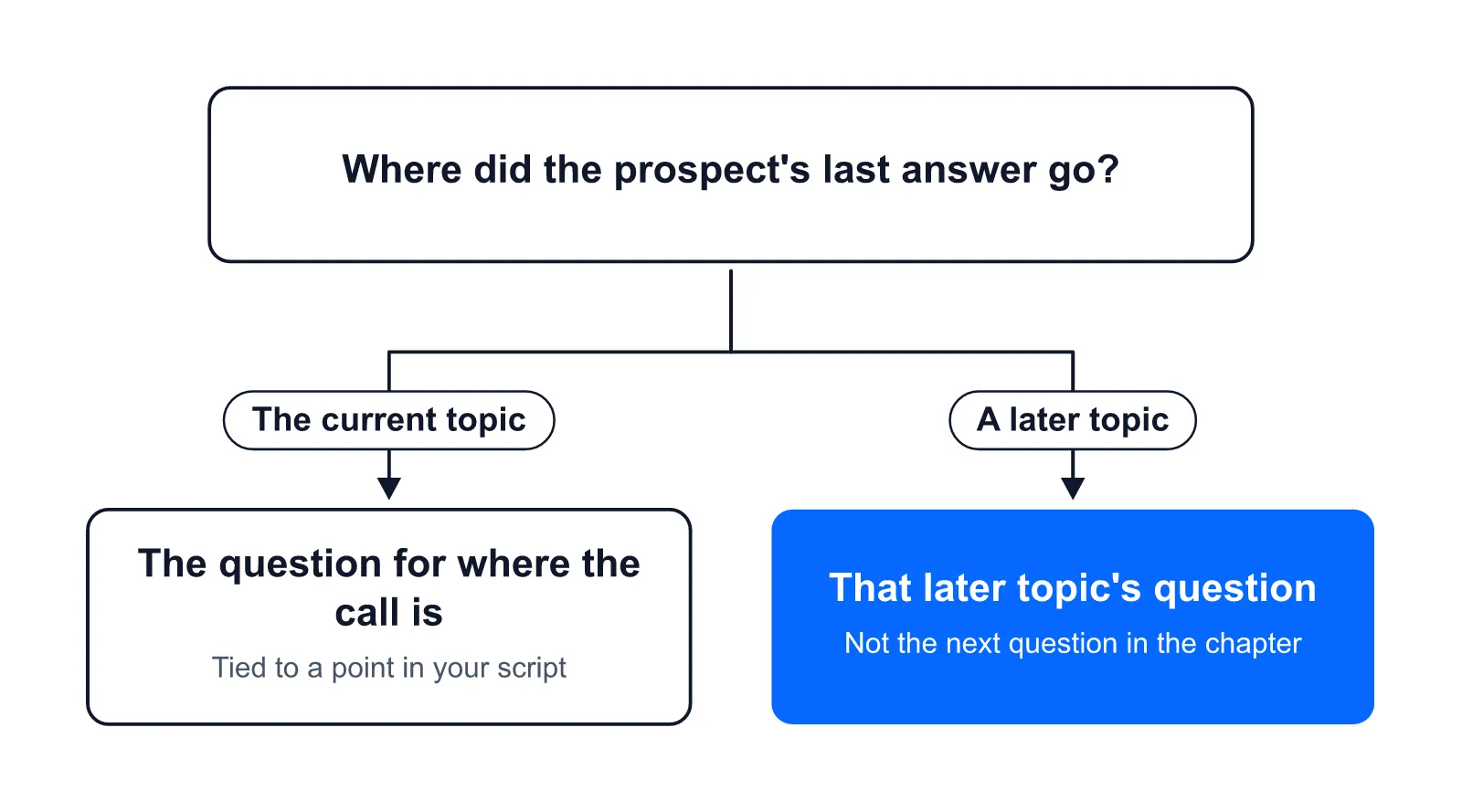
The Question card “matches rather than advances”, in the founder’s words. Each card is tied to a specific point in your script with a confidence score (how sure CallPrompter is that the moment matches), so if the prospect’s answer opens up a topic from later in the discovery chapter, that is the question that comes up. CallPrompter does not read the chapter top to bottom.
CallPrompter launched in March 2026 and was built by an engineer with twenty-five years in software. The constraint he designs against is how little a seller can absorb mid-call: short prompts, few of them, with long gaps.
Live coaching runs in the desktop app on Zoom, Microsoft Teams, Google Meet and ordinary phone calls, because it captures system audio rather than plugging into one meeting platform.
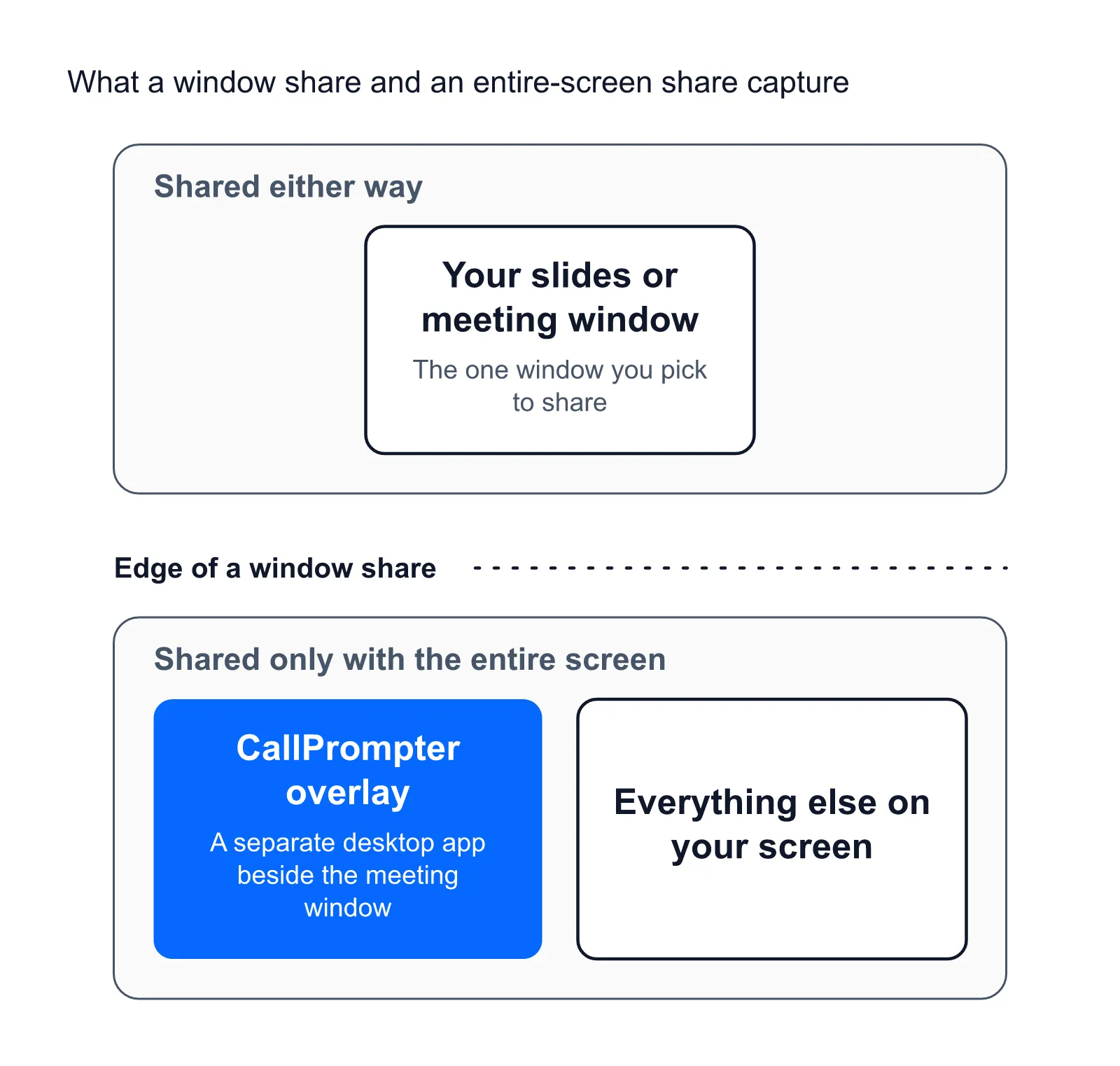
The overlay is designed to stay out of screen shares. A screen share captures the one surface you pick, and CallPrompter draws its prompts in a separate desktop application beside the meeting window:
- Share one window, such as your slides, and the overlay stays off the shared screen.
- Share your entire screen, and everything on it is shared, overlay included.
No operating system lets an app reliably hide its window from capture: Apple’s developer documentation lists the old macOS setting for this as no longer used, and Microsoft’s documentation says the Windows equivalent carries no guarantee. Our article on adding in-call help to your meeting notetaker covers what window, tab and entire-screen shares capture.
Step 4: Review the call and fix the script
CallPrompter transcribes the live call and keeps the transcript. After a practice run you get the full transcript and can replay the session in History, so you can see where you rambled and where you missed the question.
The script owner rewrites the discovery questions that did not land after the first few real calls, because that is when you find out what reps actually get asked. On the Pro plan, team script sharing puts the rewritten question into every rep’s overlay, and the manager dashboard shows the team’s calls.
What tool shows new SDRs the next discovery question and lets them rehearse it first?
CallPrompter does both, on one set of scripts. Most tools in this category do one or the other: live prompts during the call, or roleplay practice before it. For new SDRs ramping on discovery questions, the split costs twice. A question list in a document is a list you forget under pressure, and the only place left to practice is a real prospect you cannot afford to lose.
CallPrompter fixes both halves for that rep. The SDR rehearses the script’s discovery questions against an AI buyer until they come out in their own voice, then takes the same script into the live call, where the next question appears beside the meeting window. New reps in their first weeks, people selling in a language that is not their first, and teams that onboard several reps at once get the most from it.
What results to expect
CallPrompter has not published a number on discovery-call outcomes: no share of calls in which the prospect’s problem came out, no ramp-time figure for new SDRs, and no case study. The product launched in March 2026. Judge it on one practice call against a persona you actually sell to.
Where it falls short
Practice runs are not scored. You get the transcript and the replay. There is no grade, no rubric and no manager report on practice, so if you need a score for each rep over time, a dedicated roleplay platform does that, and our guide on how to choose an AI sales roleplay tool shows what to test.
Discovery cannot be drilled on its own. A practice run cannot start mid-script. It always begins at the opening, and there is no way to drill only the discovery chapter, which is a real limitation if discovery is the part you want to rehearse.
The overlay is only as good as the script behind it. Out of the box, CallPrompter transcribes and follows the call. The discovery questions it shows are the ones you supply.
Live coaching is not in the free trial. The 7-day free trial covers the script tools and 30 minutes of AI practice. Live call coaching starts on the Starter plan.
What it costs
Prices and plan allowances as listed in the pricing section of callprompter.app on September 29, 2026. All prices are in US dollars, excluding VAT, billed monthly through Stripe, with no annual commitment.
| Plan | Price | Discovery coaching included |
|---|---|---|
| Free trial | The free trial is USD 0 for 7 days, no credit card | The free trial includes the script editor, personas and 30 minutes of AI practice, and no live call coaching |
| Starter | Starter is USD 99 per month | Starter includes 24 hours of live call coaching or AI practice per month, shared across both |
| Pro | Pro is USD 249 per seat per month | Pro includes unlimited live call coaching and unlimited AI practice, plus the manager dashboard, team script sharing and the shared objection library (the team’s answers to objections, kept in one place) |
| Enterprise | Enterprise is priced per contract, from 50 seats | Enterprise adds SSO (single sign-on with your company login), dedicated onboarding and custom integrations |
The plans in brief:
- Free trial: USD 0 for 7 days, script tools and 30 minutes of AI practice, no live call coaching.
- Starter: USD 99 per month, 24 hours of live call coaching or AI practice per month, shared across both.
- Pro: USD 249 per seat per month, unlimited live call coaching and unlimited AI practice, plus the team features.
- Enterprise: from 50 seats, custom contract, SSO, dedicated onboarding and custom integrations.
Questions about discovery call coaching
Does CallPrompter make up discovery questions during the call?
No. Each Question card is tied to a specific point in your script, so the discovery questions it shows are the ones you wrote, picked to fit what the prospect just said. If you would rather not write them from scratch, the script generator writes the first version for you.
Can I practice discovery before I pay?
Yes. The 7-day free trial includes 30 minutes of AI practice, and the overlay runs during practice exactly as it does on a live call.
What do I need to run it?
Live coaching runs in the desktop app for macOS 14 or later and Windows 10 or later. macOS asks twice for microphone and system-audio permission, and that is the whole install. The Chrome extension is a separate companion that pulls contacts out of LinkedIn, Salesforce, HubSpot and Pipedrive.
Which languages does it support?
The CallPrompter interface is available in English, German and French, and CallPrompter processes conversations in all three. The website is in English and German.
Questions before you download? Send a message through the contact page and the founder will get back to you.