AI objection handling on a live sales call works as a loop of six steps. The software listens to the call and turns it into a live transcript, recognizes when the prospect raises an objection, looks up the response for that objection, and shows the rep a short prompt on screen. The rep decides what to say, and the prospect hears only the rep. After the call, the transcript is kept for review.
At CallPrompter, we built the response step around the seller’s own script: when an objection comes up, the answer written for it surfaces in a short card beside the meeting window. CallPrompter is real-time sales coaching software for live calls, built and run from Männedorf, Switzerland. The CallPrompter desktop app shows B2B sellers and sales teams objection responses, discovery questions and coaching cues during Zoom, Teams, Meet and phone calls.
Key takeaways
- The loop has six steps: listen, detect the objection, retrieve the answer, surface a prompt, the rep delivers, log the call.
- The biggest difference between tools is where the suggested answer comes from: a response someone wrote and approved before the call, or one a language model writes during it.
- A prompt that appears once the prospect has finished can only shape the rep’s next turn. In conversation, replies typically start within 0 to 200 milliseconds of the other person finishing.
- A tool that captures audio on the seller’s own computer puts nothing into the call: no bot, no entry in the participant list, no voice the prospect hears.
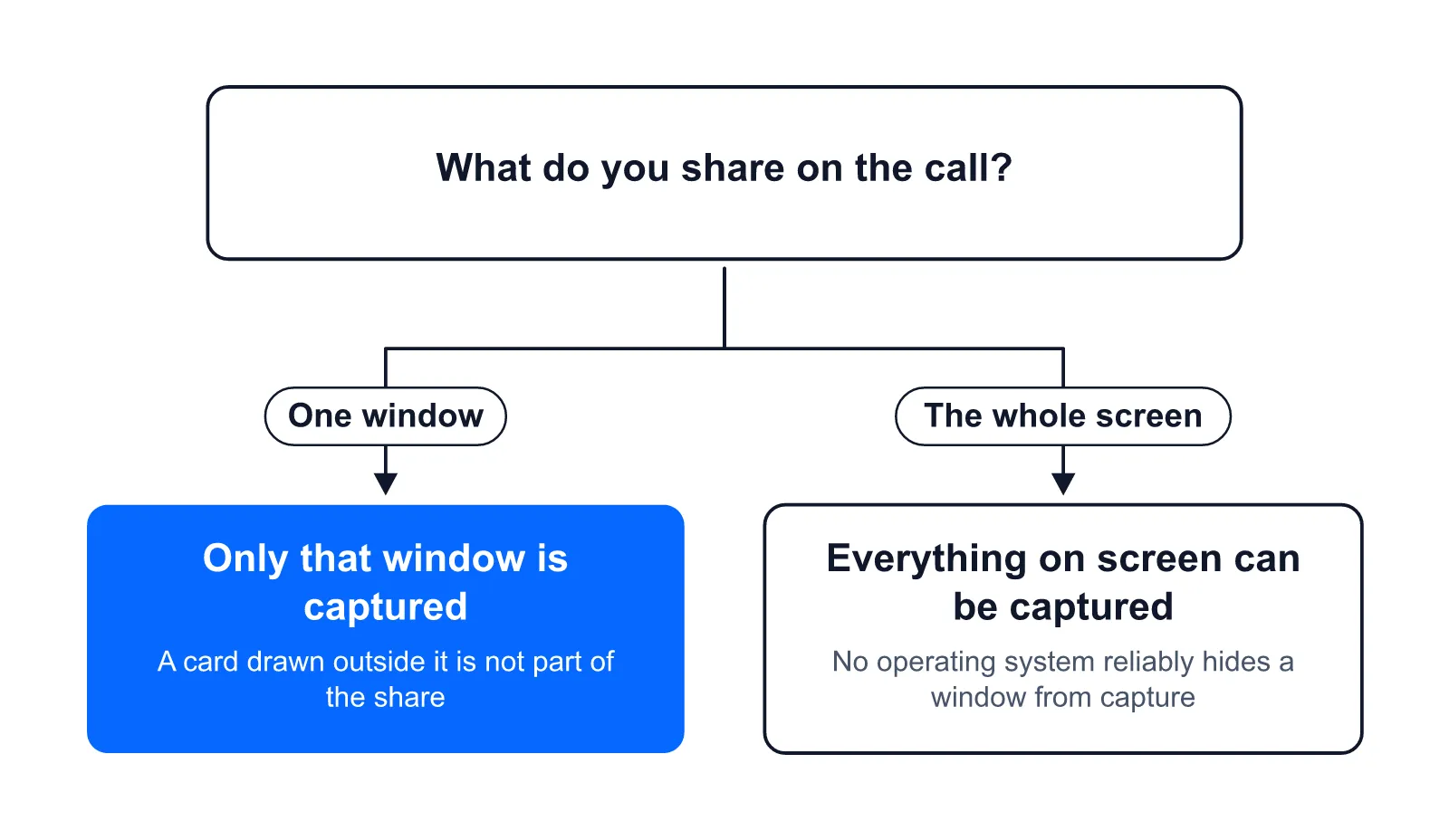
- No operating system gives apps a reliable way to hide a window from screen capture, so share the one window your prospect needs to see, not the whole screen.
- The strongest independent study of live AI suggestions measured 15 percent more resolutions per hour across 5,172 customer-support agents, in text chat, not on sales calls. CallPrompter publishes no figure on how its objection prompts perform.
- Judge any live objection tool on four questions: where the answer comes from, what reaches the screen, what joins the call, and what happens when it is wrong.
The six steps of AI objection handling on a live call
Most live objection tools run the same loop. Each step below says what the software does and what CallPrompter does at that point.
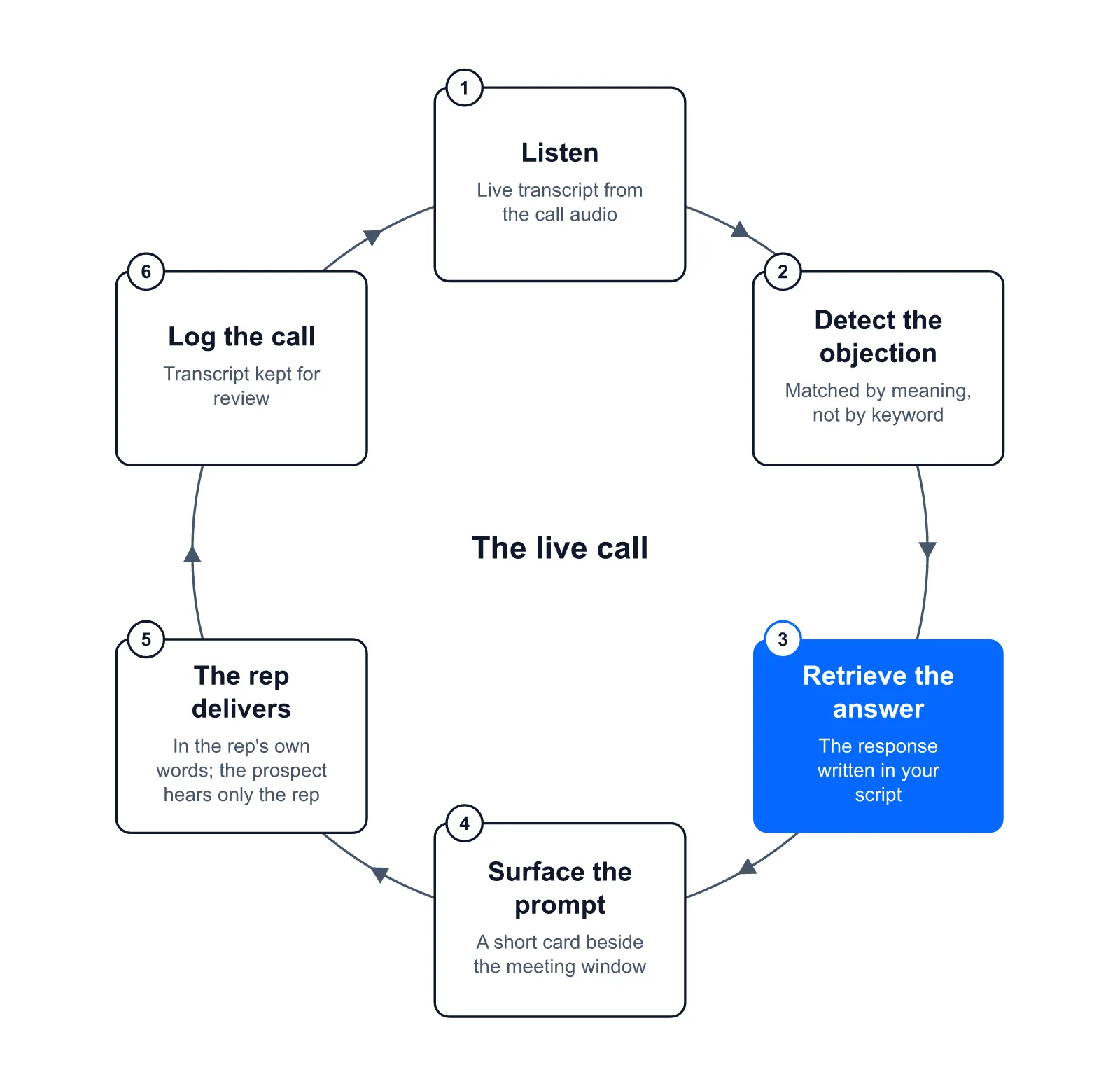
- Listen. Speech recognition turns the call audio into a live transcript. Streaming recognizers return provisional words while the person is still speaking and lock in a final version moments later (the W3C Web Speech API specification calls these interim and final results), so a tool acting on the provisional text can act on words that change. Tools get the audio in one of two ways: a bot joins the meeting as a participant, or an app captures the system audio, the sound the computer plays, on the seller’s own machine. CallPrompter captures system audio, which is why it works the same way on Zoom, Microsoft Teams, Google Meet and ordinary phone calls, as long as the call’s audio plays through your computer.
- Detect the objection. The transcript is classified as it arrives. Keyword spotting fires on fixed phrases such as “too expensive” and misses the same objection said another way. Matching by meaning compares what the prospect said with the objections in your objection library, the list of objections your script has responses for. That is how “That’s more than we budgeted for this quarter” reads as a price objection although the word “price” never comes up, and it is how CallPrompter detects objections. A pause tells the tool the prospect has finished speaking; the words decide which objection it was. Most scripts cover price, timing, status quo, authority and the “send me something” brush-off.
- Retrieve the answer. The tool looks up what to show. In CallPrompter, that is the response written into your script for that objection, the script branch for the persona (the type of buyer) you are talking to, and product facts from the product knowledge you added. Where this answer comes from is the biggest difference between tools.
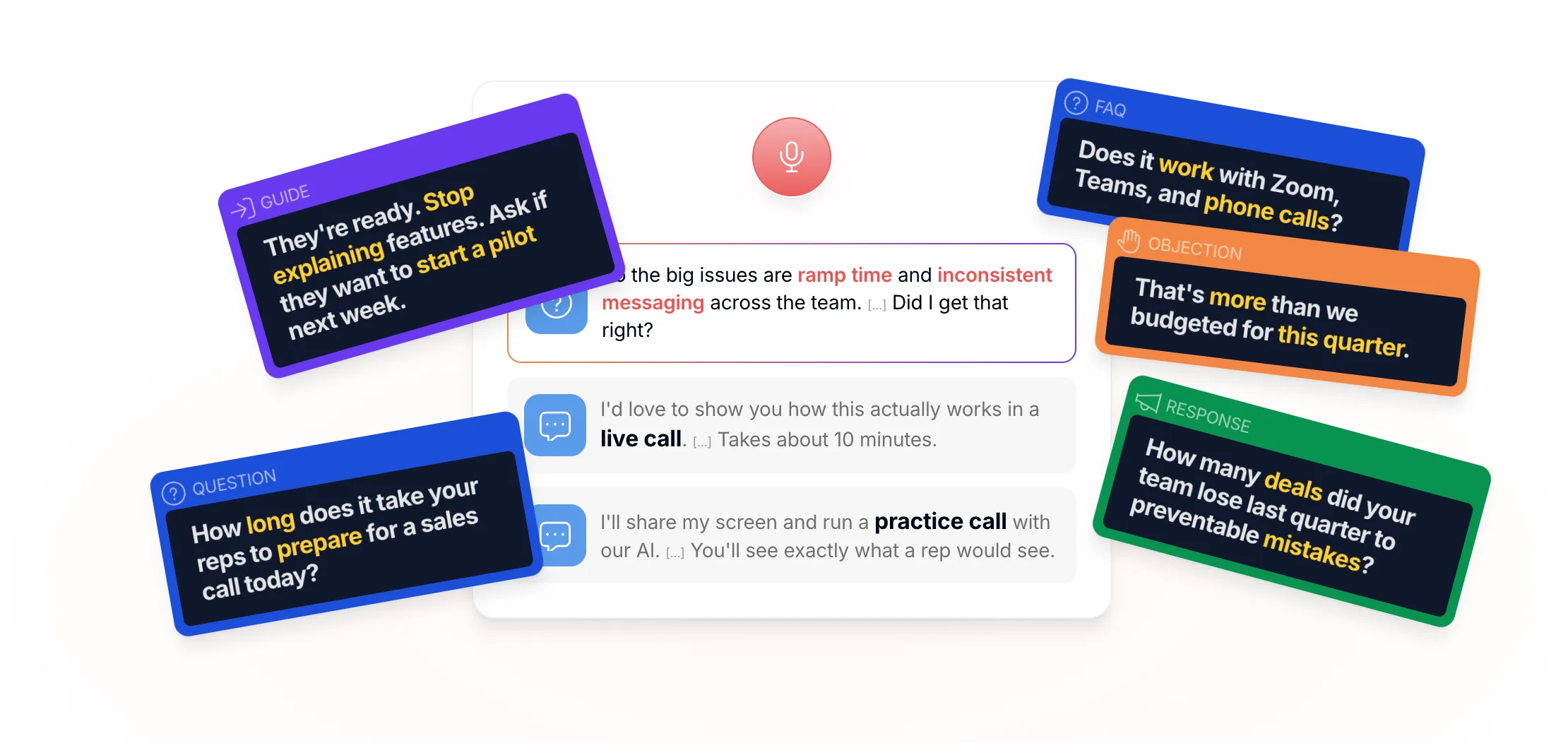
- Surface the prompt. A short card appears beside the meeting window. Ours is the Objection / Response card: the objection detected, and the answer written in your script for it. The same panel shows three other kinds of card: Question (the next discovery question), Guide (a direction cue, meaning a short instruction such as “slow down” or “ask about budget”) and FAQ (a product fact the prospect is asking about). Our design rule is few prompts, short ones, with long gaps between them, because every word on screen competes with the words you are speaking.
- The rep delivers. You glance at the card, put it in your own words, and can ignore it. For most objections the strongest first move is a clarifying question, such as asking what the price is being compared with before defending it. A moment-by-moment study of video-recorded sales conversations found that resolving responses, the ones that deal with what the customer asked, raised customer interest (Singh et al., Journal of the Academy of Marketing Science, 2018).
- Log the call. After the call, many tools write the objections raised, a summary and the next steps somewhere, often into a CRM. We keep the transcript and the signals from the call for reviewing it afterwards, and the discovery checklist that filled in during the call with the prospect’s own words. We do not write calls back into a CRM today.
What the rep sees: one objection, start to finish
Here is one objection in each of two industries, from the prospect’s sentence to the rep’s reply. The card texts are illustrations of what a script might contain, not lines from a customer’s script.
| Industry | Prospect says | Card shows | Rep says |
|---|---|---|---|
| B2B software | “That’s more than we budgeted for this quarter.” | Objection: Price. Response: “Compared with what you pay today, or with the budget line?” Then the monthly plan, no annual commitment. | “Fair enough. When you say over budget, is that compared with what you spend on this today, or with what you set aside for new tools this quarter?” |
| Insurance advisory | “I already have cover.” | Objection: Status quo. Response: “When did you last compare what it covers?” Then the comparison wording approved for this product. | “That makes sense, most people I talk to do. When did you last look at what your current policy pays out if you can’t work?” |
In the software call, the card opens with a question, and the rep answers the price objection only after the prospect has said what the price is being compared with. In the insurance call, the response is written in advance because compliance wording has to come out right every time, and a rep improvising under pressure is where it goes wrong.
Every Objection / Response card needs a response someone wrote. For a first set, start with the twelve most common cold-call objections, with talking points for each.
Where the suggested answer comes from
There are two ways a live tool can produce the words on the card. It can surface a response someone wrote and approved before the call, or a language model can write one during the call from the conversation and your company material.
| Written and approved in advance | Generated during the call | |
|---|---|---|
| What it covers | Only the objections someone wrote a response for | Anything the prospect says |
| Checked before the call | Yes, for accuracy, pricing and compliance wording | No, the words exist only once the card appears |
| Main risk | Nothing to show for an objection nobody wrote down | A wrong price, feature or term stated with confidence |
| Who decides the wording | The seller or the sales leader who owns the script | The model |
CallPrompter takes the first route for objections: the response written into your script is what surfaces. The app can generate a first script from a description of your product and the goals for the call, and that script arrives with responses to the objections that come back most often. It then opens in the editor, where you read and rewrite the lines. So the words on the card are words you have read and approved.
The risk on the generated side is documented. A peer-reviewed survey of hallucination in large language models, meaning fluent statements that are false, states that retrieval-augmented models, which look up company material before they answer, “can still produce hallucinations” (Huang et al., ACM Transactions on Information Systems). We know of no published study that compares written and generated answers head to head on sales calls, so the case for written answers rests on accuracy and control.
The overlay, the panel that shows these cards, is only as good as the script behind it. Out of the box it transcribes and follows the call. What it says is what you supply.
Which objections it catches, and who sets them up
The rep is the person coached during the call, and the card goes only to the seller’s screen. Whoever owns the script decides which objections can be caught. A founder-seller or a rep buying for themselves writes their own responses. For real-time call coaching across a sales team, CallPrompter’s Pro plan gives the sales leader a shared team objection library, so every rep’s card shows the same approved answer, and a manager dashboard that shows every call, every rep and every pattern.
The objection types worth writing responses for first, in the words prospects use:
- Price: “It’s too expensive.” “That’s more than we budgeted for this quarter.”
- Timing: “I don’t have time right now.”
- Status quo: “We already have something,” also called the incumbent objection.
- Authority: “I need to talk to my boss.”
- The brush-off: “Just send me some information.”
- The insurance set: “I already have cover.” “Send me a comparison.”
A tool that surfaces written answers has nothing written to show for an objection that is not in the library. That is the main reason scripts get edited after the first few real calls: those calls are when you learn what prospects actually ask.
Does the rep stay in control, and does a bot join the call?
Yes, the rep stays in control, and no bot joins the call. Nothing speaks to the prospect. The card is a suggestion you can use, change or ignore, and the prospect hears only you.
CallPrompter adds nothing to the call: no bot joins, so nothing shows in the participant list. The audio is picked up on your own computer, so the meeting software is never asked to admit anything. Bots are getting harder to bring in: Microsoft Teams now detects third-party bots, places them in the meeting lobby, labels them and asks the organizer to confirm before admitting them (BleepingComputer). An assistant that works through a bot can be stopped there.
What the prospect can see on a shared screen depends on what you share. CallPrompter draws its prompts in a separate desktop application, so they sit outside the surface a screen share captures. Share a window and only that window’s surface is shared. Help drawn inside the meeting window travels with the share, and ours does not. No operating system offers a public API, a documented function any app can call, that reliably hides a window from capture: Microsoft says its own capture-exclusion setting is not a security feature, and Apple describes the old macOS window-sharing flag as “a legacy constant that macOS no longer uses”. So this is a matter of what gets captured, not a guarantee. Share the single window your prospect needs to see rather than the whole screen.
No bot does not mean nothing to disclose. Transcribing a prospect’s voice can require telling them or getting their consent, depending on where each party is. US federal law allows a call to be intercepted with the consent of one party (18 U.S.C. § 2511(2)(d)), and several US states require the consent of every party, California among them for confidential communications (California Penal Code § 632). Check with your own counsel and your company’s policy before your first coached call.
Stored data, such as transcripts, scripts and account data, sits on servers in Switzerland. CallPrompter transcribes call audio in Switzerland while the call is running.
How live objection handling differs from post-call review and roleplay practice
Three kinds of tools work on objections, and they act at different times.
| Live in-call guidance | Post-call conversation analysis | Roleplay practice | |
|---|---|---|---|
| When it runs | During the call | After the call ends | Before the call |
| What it works from | The live transcript and your script | The recording and its transcript | A simulated buyer |
| Who acts on it | The rep, mid-call | A manager or the rep, in review | The rep, in practice |
| What it can still change | The rep’s next turn on this call | The next call | How prepared the rep is when the real call starts |
Live guidance acts while the call can still be saved. Post-call analysis tells a manager or the rep what happened once the call is over, in time for the next one. Roleplay practice rehearses the answers before the call, against a buyer who is not real. Post-call analysis is the category usually sold as conversation intelligence, and our side-by-side comparison of conversation intelligence and live coaching shows which job each one does.
CallPrompter does live guidance and also has an AI practice mode that runs on the same scripts, with the same overlay showing the same cards, so what you rehearse is what you see on the real call.
Where AI objection handling breaks
Every step of the loop can fail. Test these points before you trust a tool on a call that matters.
- The audio is misheard. Transcription misses words on a bad line, over crosstalk and with some accents. An independent audit of five commercial speech recognition systems measured an average word error rate of 0.35 for Black speakers and 0.19 for white speakers, roughly one word in three against one in five (Koenecke et al., PNAS, 2020). Models have improved since, but a misheard objection is lost before matching starts.
- The objection is indirect. Hesitation, sarcasm and a polite exit are easy to misread. When the card does not fit what was said, the rep ignores it.
- Nobody wrote a response. An objection missing from the library has no written answer to surface. Add it, with a response, after the call.
- Too many prompts. Help that keeps appearing competes with the words the rep is speaking. Our founder’s rule is to judge live help on how little it shows you. In a field experiment with sales agents, less AI feedback improved the bottom-ranked agents’ performance (Luo et al., Journal of Marketing, 2021). That coaching came after calls, not during them.
- The answer is out of date. A price, plan or policy changed, and the script did not.
- The rep reads the card word for word. It sounds scripted, and prospects hear it. Glance at the card, look back at the prospect and say the prepared line in your own words.
- The prompt is late for this turn. Across 10 languages, people typically start replying within 0 to 200 milliseconds of the other person finishing (Stivers et al., PNAS, 2009). A prompt that appears after the prospect finishes can only help with your next turn, which is one more reason to open with a clarifying question while you read.
What the evidence says about results
CallPrompter publishes no figure on how its objection prompts perform on live calls. We have also found no independent, published measurement of live AI prompts on voice sales calls.
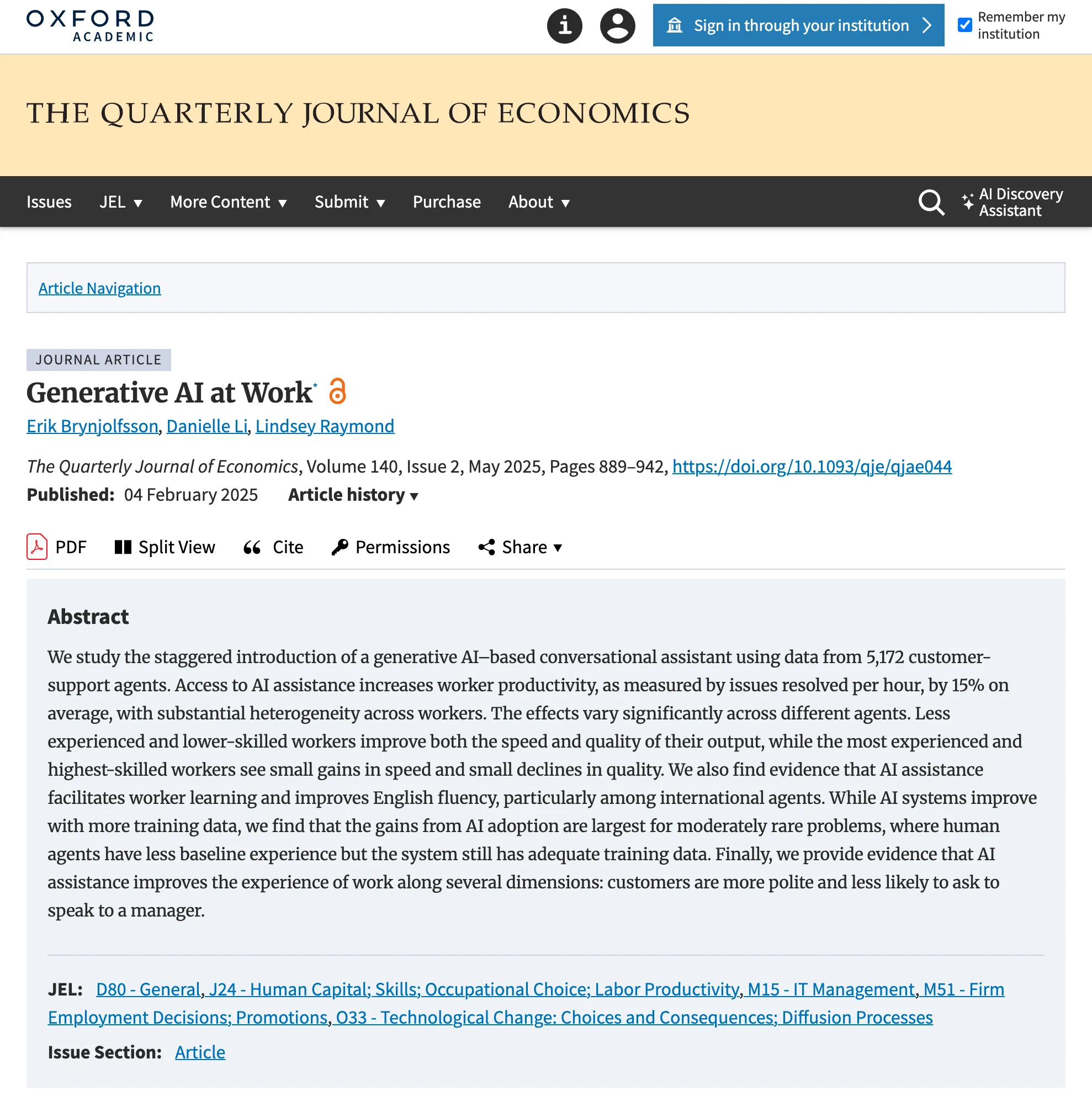
The strongest independent evidence comes from customer-support chat. Erik Brynjolfsson, Danielle Li and Lindsey Raymond studied 5,172 support agents at a Fortune 500 software company, about 3 million chats, while a real-time reply assistant was rolled out to them in stages (Quarterly Journal of Economics, 2025). Resolutions per hour rose 15 percent on average. Less experienced agents gained the most, and the most skilled agents saw small declines in quality. Three limits apply: it was text chat, where an agent can read at leisure; the suggestions were generated, not written in advance; and the researchers worked with the AI company that built the assistant. It does not measure sales-call objections.
The closest voice-sales experiment, across 3,144 calls at a telemarketing company selling credit cards, tested an AI voice bot that handled the first scripted stage before a human agent took over (Jia et al., Academy of Management Journal, 2024). It did not test prompts during the call.
So judge a live objection tool on your own calls. After your first calls, read the transcripts and note three things for each objection: which objection came up, whether the card surfaced, and whether the call reached the next step.
Questions about AI objection handling on live calls
Does the prospect know AI is helping on the call?
Nothing in the call tells them: with CallPrompter, no bot joins and nothing speaks to the prospect, so telling them is up to you. Depending on where each party is, the law or your company’s policy may require you to say that their voice is being transcribed.
Does AI objection handling work on a regular phone call?
It works on a phone call when the tool captures system audio and the call’s audio plays through your computer, as with a softphone (a phone app on the computer) or a browser dialer. CallPrompter works this way, so a call on a handset that never passes through the computer’s audio is outside its reach.
Does the AI write the answer to the objection itself?
In CallPrompter, no: the card shows the response written into your script for that objection. The app can generate a first script with responses to the most common objections, which you then edit before any call.
Do you need a script before AI objection handling works?
For tools that surface written answers, yes. CallPrompter transcribes and follows the call out of the box, but the responses on its cards are the ones you supply.
Is live call coaching included in CallPrompter’s free trial?
No. CallPrompter’s seven-day free trial covers the script editor, the objection library, personas and 30 minutes of AI practice. Live coaching starts on the Starter plan at $99 a month, which includes 24 hours of live coaching or AI practice, shared across both. Prices as of October 29, 2026.
What one objection looks like as a live prompt in CallPrompter
A prospect says, “That’s more than we budgeted for this quarter.” In CallPrompter, a card appears beside the meeting window with the objection, Price, and the response you wrote for it, opening with the question you chose to ask first. You read a few words, look back at the prospect and ask it. The transcript keeps the exchange for your review after the call.
You can build that card in the free trial: write your objection library, then run practice mode, where the overlay behaves exactly as it does on a live call. Live coaching itself is on Starter at $99 a month (24 hours of live coaching or AI practice, shared) and on Pro at $249 per seat per month, unlimited. Prices as of October 29, 2026.
Start the free trial or book a call to see it on your own script.
Questions about how objection prompts would work on your calls? Send a message and the founder will get back to you.
Related posts
Cold Call Objections and Responses: The 12 Most Common, With Talking Points for Each
How to Handle the Incumbent Objection on a Sales Call: Answering "We Already Have Someone for That" Without Naming a Competitor